Showing posts with label Cupcake. Show all posts

Saturday, June 6, 2009

Google Reader Working on Android Browser and the Case of the Disappearing Web Pages

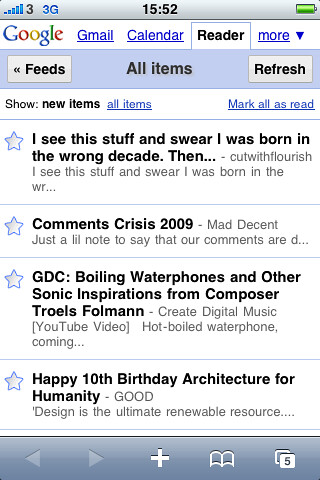
I've always been a big fan of Google Reader for reading blogs both on my computers and my mobile devices. Google created a very nice mobile version of Google Reader for the iPhone's browser a couple of years ago. This is the Google Reader you encounter when you use Android's browser to go to Google Reader. Unfortunately, this version of Google Reader has never worked well with my T-Mobile G1. It always seemed to leave read items marked as unread. As a result, it would refresh and present you with the exact same items that you had already read. This unfortunate bug made Google Reader unusable on the G1. So for reading blogs on the G1 I would use an older version of Google Reader. This version of GReader was nice and fast but it was clearly made for dumb phones and older devices like my old PalmOS Treos and Palm TX.

I decided to try the newer mobile GReader again after my G1 received the over the air update to a new version of Android (yes, this another post about Cupcake). I'm not sure if it was the new OS or if Google just fixed it while I was away but the new GReader works very well on my G1 now. It is fast and it is available from a drop down menu on the web browser's default Google home page. Unlike the older reader which links original posts to a mobile phone optomized page, the newer reader links to the original full post. With a more modern browser like the one in the G1 this is more appropriate and thanks to the Cupcake update it handles full web pages better than ever. So it looks like one longstanding pet peeve I had with my G1 has been fixed.

But another problem may have emerged. While I was waiting on line to play with the Palm Pre this morning, I was playing with my G1 with several web pages open in the browser. I was given a demo model of the Pre to play with and decided to compare the two phone's web browsers. But when I opened up my G1's browser, the only page open was the default Google home page. All the other pages had mysteriously disappeared! This has happened again at least once today and I have no idea why....

Friday, June 5, 2009

"Find on page" Makes Getting Around Android Browser Easier

The temptation of the upcoming Palm Pre notwithstanding, I am very happy with my T-Mobile G1 since the recent "Cupcake" update. One new feature which I've begun to take advantage of is the "Find on page" command in the web browser which works very nicely with the new virtual keyboard. Although buried under the "More" option in the browser's menu Find on page helps you get around web pages more quickly.

Here's an example of how:

I tend to use Chicago's public transportation system a lot and one of the nice things about it is the CTA Bus Tracker which allows me to access real time information on bus arrival times. Since each bus route on the bus tracker page has its own unique route number, selecting Find in page and typing just two digits, allows me to get to a the bus route I'm looking for faster than I could if I just scrolled the page. So by making my navigation around its browser easier, Android's new improvements also make it easier for me to navigate around my home town.

Cupcake's New Bookmarks and Some Complaints

I just wanted to write up a quick post pointing out that the updated browser in the Cupcake Android for the T-Mobile G1 has one noteworthy improvement (besides enabling copy and paste). The Bookmarks menu now has three tabs and includes a list of Most Visited websites and a History tab. Before the update, History was a seperate menu item. Now it has been folded into the Bookmarks menu and is organized with submenus for items from "Yesterday," "5 days ago," "1 month ago," and "Before 1 month ago." Each website has a handy star which you can tap to turn it into a Bookmark. The Most Visited tab has these stars as well. This is a very welcome improvement over the old Bookmarks and History menu items.


The GMail application has also been subtly improved with little checkmarks that allow you to select multiple items for tasks like deleting spam. Unfortunately, GMail is actually a bit slower now than it was before the update. In fact despite Cupcake's improvments, my G1 phone is still relatively slow at times. It's not overwhelmingly slow but does slow down nevertheless. 

Another disappointment? Twidget, the little widget for displaying Twitter updates. I really like this little widget at first but after about 24 hours it started crashing repeatedly and I had to uninstall it. This is a shame, I hope it gets fixed soon because it was a nice little app.

Thursday, June 4, 2009

Cupcake's Camera and Widget Improvements

After a few days with the Cupcake update, I'm still discovering new things on my T-Mobile G1. The camera software for example has improved a bit. It hasn't crashed on me since the update which is a good thing considering how unstable it was before. It has also improved the interface by adding a camera icon which acts as a shutter switch for taking pictures. As with the physical camera button, I've found that holding until the camera snaps gives better results than just tapping it since it compensates for the G1's slow shutter speed.

A second icon shows a thumbnail of the most recent picture which has been taken with the camera. Tapping on it leads to a full screen picture overlaid with icons for managing pictures. In other words, it's a simple picture viewer. You can flip through pictures, enlarge them, set them as wallpaper or contact icons, share, and delete them. Menu options include rotation and cropping. Some of these options were already available in the original camera app but they are now better organized and easier to use.


One thing that wasn't available before was the Camcorder application which is exactly what the name implies—a video recording app. I haven't had chance to play around with it but it's nice to know it's there.

I also noticed that the naming convention for pictures taken by the camera has changed. Instead of naming each picture with string of numbers that begins with "124" on my phone, it now names them with a number that is made up of the date and time (down to the second) on the picture was taken.


Another addition that Cupcake brings to Android is better support for widgets that sit on your desktop. As a result, there is finally something interesting besides clocks and search boxes to put on the desktop. I find that the Weather Channel and Twidget Lite (for Twitter) widgets are nice for at a glance information. Of course these widgets do take up a lot of space. It's a good thing Android has a three screen desktop.

Saturday, May 30, 2009

Finally Got Cupcake

T-Mobile G1 (HTC Dream)Image by Aaronage via Flickr

My T-Mobile G1 finally got the over the air update from T-Mobile about an hour ago today. The changes are subtle but welcome, prettier icons and refined colors which nice use of shading and 3D effects—particularly in the notification and launcher drawers. The locked screen now displays the usual carrier, time, and date information on top of your wallpaper instead of over a black background. In the phone application, the Call log, Contacts, and Favorites items look a little better and are slightly better organized. Adding and editing contacts has always been fairly clunky on the G1 and the Edit dialog box addresses this problem by adding plus and minus buttons which allow you to quickly add and remove information which was previously buried under sub-menus.

The most noticeable additions would seem to be the virtual keyboard and voice search. The virtual keyboard works about as well as you would expect, which is to say not particularly well but it's nice to have it for quickly entering a few characters without opening the G1's physical keyboard. Voice search has mixed results at best, a search for "palm pre" was interpreted as "palm tree" and "cancrete" while searches for "t-mobile" and "sprint" were interpreted correctly.

One nice improvement is the improved use of the G1's accelerometer. Before, the only way to get the G1 to switch from portrait to landscape mode was by opening the keyboard. The web browser also had a menu item for switching the orientation. Now, with Cupcake, there is a global system setting which allows the G1 to flip its screen orientation automatically in most applications when you physically rotate the phone. This is great for the web browser but does not work with the desktop or the dialer (it does however work when editing contacts). While the automatic orientation switching is a fraction of a second slower than opening the keyboard, it is far more convenient.

It's still too soon to say if this new system software makes the G1 any faster or more stable but the improvements it brings are definitely welcome and make the T-Mobile G1 a better phone.

Update: I just discovered another great feature brought by the Cupcake update. The browser has now enabled copy and paste. Hit the "Menu" key and select "More." Then tap on "Select text." Highlight the text you want to copy and it will automatically be copied to the clipboard. Outstanding!
Reblog this post [with Zemanta]

Twitter

robertocastillo's shared items

My Blog List