Showing posts with label Internet. Show all posts

Monday, May 18, 2009

Wolfram Alpha—For Times When Google Isn't Nerdy Enough

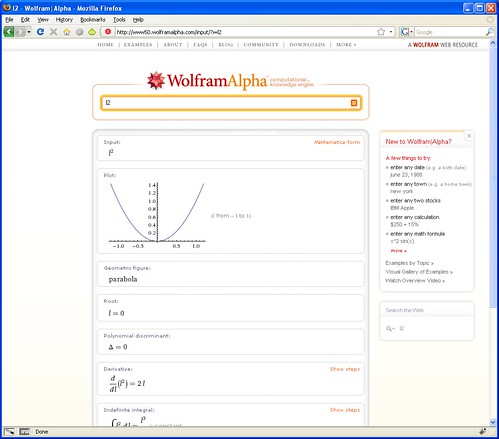
There has been some talk about a new search engine called Wolfram Alpha. Well, the search engine with the name of a Joss Whedon villain is finally public and it puts a decidedly different spin on Internet search than Google. Whereas Google will return a list of links for your search query, Wolfram Alpha treats it as a question and tries to supply answers to it. "Big deal," you say. "Ask Jeeves did that years ago and it sucked." Actually, Wolfram Alpha is very different in the way it supplies answers. Wolfram Alpha takes a strong mathematical/analytical bent. A quick query of this search engine using my birthdate tells me that among other things, I was born on a Saturday and that the moon was in a waxing gibbous phase. I also told that Bradley Schlozman, a politician whom I've never heard of and that Brian Stepanek, an actor whose name I find vaguely familiar share my birthdate.

Searching Google for the same date told me no such thing. For one thing, Google doesn't seem to recognize my dirthdate as a date. Instead it returns a lot of links of documents which have the numbers in my birthdate but don't necessarily correspond to that specific date. It also shows a Google Calculator equation showing that my birthdate adds up to -71. On the other hand typing the word "Buffy" into Wolfram Alpha returns nothing while Google returns numerous links full of information relating to Buffy: The Vampire Slayer. In a similar vein, putting the word "pants" into Wolfram Alpha just returns a definition and some interesting ways to display synonyms for that word while Google returns numerous links ranging from where to buy pants to pictures of pants. It begins with a Wikipedia article on the history of trousers and includes a link to something called "No Pants Day" which encourages people to not wear pants on the first Friday of May.

Moving on to more mathematical ground which is supposed to be Wolfram Alpha's strength has more interesting results that show off the relative strengths of both search engines. A search query for "2000 census" on Wolfram Alpha shows some nice graphs and tables of world population data. On Google, the results are more U.S. centric beginning with U.S. government's census website. It also includes a huge list of links to census data from various sources.

While it seems impossible for Wolfram Alpha to match the richness of Google's results, this new search engine seems more interested in finding a niche of providing quick answers to specific mathematical questions. While Google wants to rule the world, Wolfram Alpha has set its sights on a small group of nerdy researchers.

Thursday, November 13, 2008

Chrome: Is This Your Father's Web Browser?

A couple of months ago I set up a computer for an older couple who had never used a computer before. It was an old laptop with busted hinge but it was in otherwise good condition and it was an easy matter of setting it up with an external monitor and wireless keyboard and mouse. Neither of them knew much about computers and they just wanted it for e-mail and web browsing—the same as most computer users these days.

When it came time to choose a web browser for the computer I wanted to steer them away from Internet Explorer. Besides being slow and bloated, IE is a magnet for hackers if for no other reason than the fact that it is installed on the vast majority of computers. So I installed Opera on the computer.

It seemed like a good choice at the time, Opera is small and fast—perfect for an old computer with only 512MB of RAM. Unfortunately, Yahoo! Mail didn't cooperate. Several days after setting up the computer, I began receiving calls about the a problem between Yahoo Mail and Opera. For some reason it kept redirecting Opera from its Inbox to the log-on page. I never figured out exactly why this was happening. So I installed Chrome—Google's then new browser—on the computer and the older couple has been happily using it for e-mail and web browsing ever since.

Chrome hasn't made much noise since the week when it was launched. A lot of geeks (myself included) downloaded it, complained about a lack of features and possible privacy problems, and quickly went back to Firefox. But from my perspective setting up computers for people—many of them older—who really know nothing about computers and don't care about cookie handling or security.

For these people, Chrome's shortcomings suddenly turn into strengths. Chrome was designed from the ground up to run javascript so temperamental web applications like Yahoo! Mail are more likely to run properly on it. Chrome runs in the background quietly updating itself through Google's Updater application even when it is supposed to be "closed." While more tech-savvy and paranoid people see this as a potential privacy risk, for people who neither know nor care about security or privacy issues, this is an invaluable feature since their web browser always has the latest updates and patches. While there is no way to control how javascript and cookies behave on a site by site basis, people who lack computer savvy won't know how to use these features anyway, so for them relying on Google to handle these potential threats makes sense. It all comes down to how much you trust Google—maybe you and I don't always trust Google but most people don't care one way of they other. For them Google's web browser is just another program that they run on their computer.

So for confused newbies, Chrome's lack of features and minimalist interface are an advantage. Ironically enough, Chrome's name comes from the term used by web developers for the buttons, menus, and other widgets that constitute the browser's interface. But Chrome has very little "chrome" compared to other web browsers; just front, back, and reload buttons, a combination address/search bar, and a couple of hidden menus which are easy to ignore. It even tucks its tabs into its title bar which further reduces clutter. And while Google has talked about producing add-ons for Chrome, there are currently none available. There are no toolbars or extensions for Chrome. But then again, too many extensions can slow Firefox down and toolbars are frequently more trouble than they are worth for Internet Explorer users.

So if you are a tech-savvy nerd who has been wondering what Google was thinking when they put out Chrome, maybe they were thinking about your mom and dad.

Thursday, October 30, 2008

The Acer Aspire One—Small is the New Black

I have been using the Acer Aspire One for about a week. It is one those "netbooks" that are so hip these days with the techie set. Although netbooks themselves as are a new category, the concept of a tiny notebook computer isn't that new. Sony, Panasonic, and Toshiba were all making tiny laptops for sale ten years ago. But usually these little notebooks would cost upwards of $2500 and were for the most part only available in Japan.

Originally uploaded to Wikipedia by Rico Shen http://en.wikipedia.org/wiki/User:BrockF5

But things have changed recently. As computer hardware prices have fallen and the Linux operating system has improved to the point where it can be seen as a viable alternative to Windows, it has become possible to build a really small and really cheap laptop computer. My Acer Aspire One cost me $399.


A Little History


The netbook trend has been building for about a year and a half. It sort of started when Palm, looking to revitalize its line of smartphones, announced the Foleo, a simple Linux-based laptop which was meant to be a large keyboard and screen for its Treo smartphones. Palm is primarily a cell phone and PDA maker not a computer company—and it showed with the Foleo. Equipped with wi-fi and a lightweight Linux operating system, the Foleo was capable of being a useful computer in its own right but Palm had primarily meant for it to be an accessory and marketed it as such. Because of this, the Foleo was woefully underpowered and had very little storage of its own. It was also very expensive for a phone accessory—$600, about the same price as a big clunky laptop. While its small size (which it achieved despite having a keyboard and screen which were larger and more useful than what has become the standard on netbooks) was attractive, the Foleo lacked the functionality to justify its price and Palm pulled the plug on it days before it became available for sale. I personally suspect that if Palm had tried to sell the Foleo at half the price they originally intended (in other words for $300 instead of $600), it would have been reasonably successful.

After Palm's embarrassing face plant, Asus came out with a little notebook called the EeePC. Running a lightweight version of Linux and powered by an Intel Celeron processor with a tiny screen and keyboard, the original family of EeePCs cost just $300-$500 and they were a rip-roaring success selling 355,000 units in six months. This just opened up the floodgates with competitors coming from MSI, Acer, Dell, HP, and others.

And that brings us to the Acer Aspire One which I am using now. Over time, netbooks have gravitated to a common set of specs and the Acer Aspire One is no different. It has an Atom processor which is Intel's new mobile friendly chip which has become almost ubiquitous in netbooks. It has a small but above average for netbooks 8.9 inch, 1024x600 pixel screen and a fairly small but usable keyboard—you won't be composing any novels on this keyboard but it's fine for e-mail. What separates this particular version of the Acer Aspire One from other netbooks is its 1 GB of memory and 160 GB hard drive. This is enough storage space to comfortably run Windows XP instead of the sometimes quirky Linux distributions which other netbooks use. As a result, my Acer Aspire One feels more like a normal laptop than like a "netbook."


Size Versus Speed


Without a doubt this notebook's number one feature is its small size and weight. At only about 2.5 pounds, lifting and carrying it is effortless. Here are some pictures of my 8.9" Acer Aspire One together with a 15.4" HP Pavilion dv6000 notebook and a Palm Treo 680 smartphone for comparison.


The small size of this notebook mitigates a lot of its shortcomings. I've heard people complain about the heat produced by the Acer Aspire One but I've never had a problem with it in part because it's too small to cover my entire lap. I can just prop it up on one knee for hours and barely feel any heat. This is in start contrast to my larger HP laptop which runs at least as hot, if not hotter, than my Acer netbook and because of its heat and weight quickly becomes uncomfortable in my lap. While in its default configuration Windows XP runs a bit slowly on the One, turning off its visual styles and other eye causes it to speed up considerably. (I never cease to be amazed at how much useless, performance-choking crap Microsoft adds to its operating systems.) Turning off Windows XP's visual styles also allows you to make better use of the One's small screen as XP's default styles tend to take up a lot of room on your screen.

The One also has some other useful little tricks. Intel's underpowered but useful graphics hardware comes configured with keyboard shortcuts which allow you to rotate the screen. Normally this would be a useless little trick but on the One, the screen rotation allows you to comfortably read long web pages and documents like a hard cover book. Unfortunately, when you rotate the screen, the keyboard and mouse axes remain the same which makes anything other than scrolling text awkward.

Despite all these nice little tweaks, the One still feels a little slower than a typical full sized laptop. Note that by full sized laptop, I'm referring to my two beefy HP laptops which run on dual cores and have 2 and 3 GB of ram respectively. So the One is about as fast a single core laptop with 1 GB of ram. Having said that, web browsing does "feel" a little slower on the One. I'm not sure exactly why that is, maybe its the Atom processor or maybe it's the wi-fi chipset. Or maybe it's a problem with Windows XP.

When I installed Ubuntu on the One, it detected two processors. Since most personal computers have only one processor this is usually a sign that you have a dual core processor or a processor with hyperthreading. In fact, it does appear that the Atom processor is hyperthreaded. But does Windows XP handle the Atom processor's hyperthreading? I'm not particularly knowledgeable on the issue but if I'm not mistaken, Intel abandoned its hyperthreading technology in its desktop processors in part because Windows didn't handle it well. If this is the case—and I don't really know enough about the issue to say that it is—then it might be the part of the problem. (If someone actually reads this blog and does know about this issue, I'd appreciate an e-mail on the subject.)


Software


Like most Windows laptops the One comes with a lot of crappy third party software although it comes with less than what is preloaded on HP laptops. In any case, it's nice to have PC Decrapifier around to get rid of the cruft. (Why did Acer include a copy of InterVideo WinDVD on a laptop with no DVD drive?) The idea behind netbooks is that they are lightweight both in terms of size and software and rely on Internet-based "Web 2.0" "cloud computing" to get work done. I am actually finding that I use much the same software that I would use on a normal PC. In fact at least one Web 2.0 application, Yahoo Mail actually complains that my One's screen resolution is too low even though I think that it looks just fine. Another Web 2.0 application, Google Groups gives you a full, unfiltered view of Usenet which is a little like giving you unfiltered sewer water to drink. Sorry cloud, I think I'll stick to the same e-mail and Usenet application that I've been using for over a decade thank you very much.

I was expecting that Google's Chrome browser with its minimalist interface would be ideal for a netbook. In fact I've found that good old Firefox when used in full screen mode is the best choice for me when browsing the Internet. This is great for me since I can use Foxmarks to synchronize my bookmarks between the One and my home computer which is just a really big laptop.

Beyond that, I use the One very much the same way that I would use a normal laptop. I use Firefox to surf the web, Agent for e-mail and newsgroups, GOM Player to watch video, TightVNC to log into my other computers, and Synergy to seamlessly share my mouse with my bigger computers.


Final Notes


I've only been using my Acer Aspire One for about a week but I'm already very comfortable with this little notebook. It has a glossy dark blue finish which looks great when you take it out of the box but which is also a magnet for fingerprints. It has a six cell battery which delivers about five hours of battery life. This changes the way I use my laptop. I don't worry much about battery anymore. I keep it next to my bedside for use on sleepless nights and lazy weekend mornings. It slips easily into my backpack when my older HP laptop needed some elbow grease to fit. I can take it anywhere that I expect to be able to find available wi-fi access.

This computer certainly isn't perfect. It's a little slower than what I'm used to. The touchpad has awkwardly placed buttons and is bad even by touchpad standards. The keyboard is usable but can't be recommended for long typing sessions (I'm typing this review on my big HP laptop). I've seen netbooks positioned as computers for younger people—college students, teenagers, even children. Well, with their smaller hands and sharp eyes, younger people will almost certainly be less bothered by the shortcomings of netbooks than older people.

But the bottom line is that its small size and long battery life give this computer a degree of freedom that bigger laptops can only aspire to. So as one of the first netbooks that seems to really hit the sweetspot in terms of usability for me, the Acer Aspire One is aptly named.
Atlas of Cyberspace

A Usenet posting alerted me to a blog post which alerted me to the Atlas of Cyberspace, a colorful book which visualizes and explores the infrastructure of the Internet. If you are curious about the design of the tubes which bring you your cat pictures and spam, this free downloadable e-book is a must read.

Wednesday, October 1, 2008

Firefox Extensions: An Embarrassment of Riches

One of the great things about the Firefox web browser is the rich mosaic of extensions which are available for it. I recently excitedly installed an extension called Hyperwords which promises to pop up a wealth of references from any word which you highlight. It looked awesome but once I restarted Firefox and had a chance to play with it, I realized that I already have several extensions which already do much the same thing. CoolPreviews does the same thing on a smaller scale—it only pops up results from Google, Google Images, The Free Dictionary, and Wikipedia while the list of references is Hyperwords pops up is too long for me to list. But CoolPreviews also pops up a minimalist window on top of my current one with a preview of any url without opening seperate page. This is a huge time saver for me which allows me to go through web pages more quickly but it's still a duplication of functionality.

And it's not the only one. Ubiquity is also an extension which I installed enthusiastically and it too replicates a lot of the functionality of Hyperwords. But it is also one of the most ambitious extensions ever created for Firefox. Essentially a command line for the web, Ubiquity can bring up everything from maps to the weather and email, twitter, slice, and dice them in many different ways. It's tremendously fun to play with and useful and it promises to grow more sophisticated as it continues to develop.

But in the meantime, I have a growing list of extensions (twenty four in all) and Firefox no longer loads instantaneously as it did when I first installed it. In fact, it actually takes about thirty seconds to start which doesn't seem like a lot but it means that Chrome, which is Google's web browser, loads instantaneously but it lacks the powerful extensions to which I've become accustomed to on Firefox. It's an interesting conumdrum, speed versus power. It's compelling enough that I often run Firefox and Chrome side by side. But that's life on the modern Internet I guess, tons and tons of information and tons and tons of ways to use it and manipulate.

Tuesday, July 29, 2008

Cuil—Google's Kid Goes Goth


It may come as a surprise to younger web browsers but there was actually a time when "Google" wasn't synonymous with search engines. In fact, there was a time when Google didn't exist at all. In the early days of the mid-1990s, there was no place to go looking for information.

Then Yahoo came along with its nice little web directory and the search engine wars began. For several years, a number of search engines with names like Yahoo!, Excite! (exclamation points were big in those days), AltaVista, and Hotbot vied for eyeballs with flashing banner ads vying for advertising dollars and assaulting the senses. Some of them even had useful features. AltaVista, for example, could translate web pages from one language to another. But as the search engine wars accelerated, search pages evolved into ever more bloated "portals" and search was relegated to an afterthought.

Then Google came along. A late-comer to the search wars, Google blew the competition away with two weapons: its powerful page ranking algorithm, and minimalism. While other search engines where turning into bloated messes, Google presented the average web surfer with a much simpler page—a page which looked much the same then as it does today. Once Google found a way to use its search results make tons of cash without annoying too many people, it was all over.

Flash forward to the present. Former Google employees have started Cuil, a new search engine that aims to take a bite out of the hand that once fed them. Like its predecessor, Cuil presents the user with a simple web page. In fact, Cuil's page is even starker than Google's. I don't usually like white text on a black background but unlike other white on black pages, Cuil's actully does succeed in looking cool without impairing usability. The real difference for users shows up in Cuil's search results.

Cuil does a nice job of laying out and organizing search results. Popular search results are organized by categories in an attractive tabbed layout with more thorough descriptions than the ones you'll find on Google. An image from each page is also added the description; while these images are usually related to the page, sometimes Cuil will merely display an ad that just happens to be on the page. Speaking of images, even though Cuil, like Google, has a "Safe Search" feature designed to filter out pornography, I didn't notice much difference between searching with this feature on or off.

So can Cuil compete against Google? Probably not. Google at this point, is turning into another Microsoft in terms of its power on the web. With a wide array of services, ranging from search, to advertising, to video, and beyond, Google is simply too big to fail. Cuil might be able to carve out a niche as an easy to use alternative search engine—an Apple to Google's Microsoft but it can't become a David to Google's Goliath without some divine intervention. Nevertheless, Cuil will be exciting to watch if for no other than reason than to see if its competition can drive Google to be a better search engine.

Update: I could have sworn that I'd seen a slashdot article about Cuil and sure enough here it is. As always, the discussion was pretty interesting. Most of the slashdot geeks are dismissing Cuil but there was also a surprising amount of hostility towards Google in the comments. It surprised me but perhaps it shouldn't have.

Friday, July 25, 2008

You May Already Be Under Attack....

Slashdot has an interesting link to an article about the fact that malware authors have been targeting Blogger (which is the blogging engine that powers this blog along with millions of others) heavily. Since Blogger is owned by Google, this means that about 2% of all malware is hosted by Google. There are three big reasons for this:
  1. It is easy to automate setting up a blog on Blogger
  2. It is easy to set up Blogger to redirect links to another site
  3. Blogger is owned by Google so it's blogs are automatically indexed by Google's search engine
As a result malware authors are drawn to Blogger and set up 16,000 malicious web pages every day—Google simply can't flag and delete these pages fast enough. It's an interesting phenomenon that is repeated over and over again. Call it the "Windows Effect"—a computer product or service becomes so popular that it becomes ubiquituous and it will inevitably be targeted and attacked by hackers. Just like Windows in general and Internet Explorer in particular have been (and still are) popular targets for hackers, now it's Google's turn. And it's not just Google either. MySpace and Facebook are also popular malware targets. Congratulations guys, you've been pulled into the same infamous club that Microsoft has been trying to kick and scream its way out of for years.

Saturday, June 28, 2008

Is AVG Bad For Websites?

A new website called AVG Watch claims that a component in AVG's antivirus product can overwhelm web servers by hitting them hard and downloading pages in an attempt to determine if they are hosting malware that can infect your computer. Another website complains that this component also hurts websites financially by skewing their traffic statistics which affects their ad revenue.

The component is called LinkScanner:
"LinkScanner works with both Internet Explorer and Firefox, and consists of two features, AVG Active Surf-Shield and AVG Search-Shield. AVG Active Surf-Shield prevents you from accidentally becoming infected by drive-by downloads and other exploits, ensuring the web pages you visit are safe at the only time that really matters - when you are about to click the link. AVG Search-Shield works with Google, Yahoo and MSN search engines to deliver a real-time safety verdict on all search results, including search ads, displaying an icon to show the safety rating for each site."
That's a direct quote from the documentation of AVG Anti-Virus Free 8.0 describing LinkScanner.

AVG Watch seems pretty steamed about the practice, comparing comparing it to a Denial of Service Attack. They claim that according to their own tests LinkScanner will download a page it encounters during a Google search hundreds of times more than necessary, leading to a lot of stress on webs servers as the number of people using the latest version of AVG Anti-Virus grows.

This seems like a worrisome possibility for me since I've always sworn by AVG for protecting my computers from viruses and other malware. Recently, AVG has been giving me problems with false positives and now this....

There is one ironic post-script to this episode. I have been using Firefox 3 as my main browser since its second Beta version and right now AVG Safe Search, which presumeably allows AVG to run LinkScanner within Firefox, is not compatible with the latest version of my favorite browser. So it seems that none of this applies to me right now. I'm neither "protected" from accidentally clicking on evil websites and I'm not inadvertantly "attacking" good websites either. Still, it's an interesting issue.