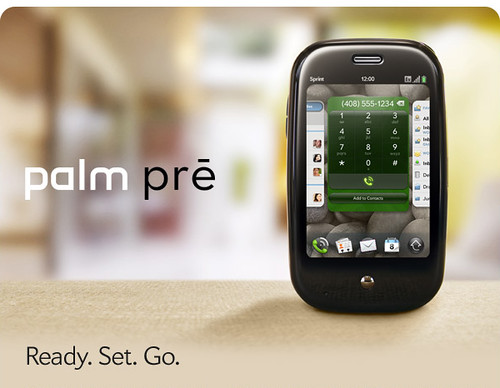
The Pre's immediate successor, the Pre 2 is only available on Verizon and sales people tend to steer people away from it. The Veer, a tiny little phone which combines the best features of the Pre and Pixi phones with some nice, fast hardware is only available on AT&T and is similarly neglected. The Pre 3 which was announced in January has yet to debut anywhere.
Showing posts with label Palm. Show all posts
Friday, July 22, 2011
Palm Pre Makes Yahoo's List of Phones Doomed to be Collectibles
Tuesday, November 23, 2010
Good News for PalmOS Fans
For a while it looked like Palm had turned its back on PalmOS, the operating system which had powered its PDAs and smartphones for year. And to a certain extent they have but the situation may not be as dire as die-hard PalmOS fans had thought.
With the latest version of webOS, version 2.0, Palm has removed the PalmOS ROM from the phone which is the actual code which the Classic PalmOS emulator uses to run PalmOS apps on webOS phones like the Palm Pre and Pixi. It was a serious enough problem that MotionApps, the company which makes Classic essentially threw in the towel and stopped selling Classic. But it turns out that with a little digging and command line hacking, that the PalmOS ROM can be installed on a phone with webOS 2.0.
Two interesting points come out of this development. One, longtime PalmOS users who have already purchased Classic will be able to continue using once they upgrade to webOS 2.0 devices like the Pre 2 or after their older devices are automatically upgraded to webOS 2. The other interesting point is that since the PalmOS ROM is clearly separate from the Classic emulator, then creating a PalmOS emulator for webOS might be a lot easier than people realize. Even if MotionApps stopped selling Classic, it should be possible for someone else (perhaps even Palm themselves) to create an emulator for PalmOS apps.
While I wouldn't expect to see a lot of PalmOS emulators coming out any time soon, it's an interesting thing to note that since Palm is putting out the PalmOS ROM themselves through their webOS Doctor software, it should help keep PalmOS die hards going while they search for webOS equivalents to their beloved PalmOS apps.
Labels:
Classic,
Palm,
PalmOS,
Phone Angst,
webOS vs PalmOS
Sunday, November 7, 2010
Palm Drops Classic, Why It Matters.
Two weeks ago MotionApps, the developers of the Classic PalmOS emulator for webOS, announced that they were discontinuing Classic due to a dispute with Palm:
While Palm has worked hard to foster developer interest, they are facing an uphill battle. Currently the webOS App Catalog has roughly 4300 apps. Add in the apps in Palm Web and Beta feeds and that number jumps to well over 5000. But Apple's iOS has 250,000 apps and Google's Android has 140,000 apps. And this isn't just a matter of quantity over quality, there are many unique and powerful apps which are not available to webOS users. A lot of this stems from limitations in the APIs of webOS and in the hardware of webOS phones. And that's all the more reason why Palm needs the Classic as a bridge between the limitations of webOS and the power of PalmOS. More than 30,000 PalmOS apps can be run in Classic.
Ultimately, it does Palm no good to further alienate a group of developers which were already upset with the move from PalmOS to webOS and who are attracted by the much greener pastures of Android and iOS. MotionApps has handed over the Classic source code and intellectual property rights to Palm, so Palm has all it needs to restore and support Classic themselves. There would seem to be no reason why they couldn't put it back in a future version of webOS.
So it makes a lot of sense for Palm to support Classic. They already go out of their way to support webOS and Homebrew developers. And they are working on tools to allow developers to build "hybrid" apps which will use both traditional C/C++ code and the HTML/Javascript code that powers webOS apps. A PalmOS emulator like Classic, could be another tool for Palm to get apps on to their platform.
Classic wasn't perfect. It was slow and it was the only app on webOS that could actually crash my phone. And using felt like living in a mobile computing ghetto—PalmOS apps ran inside Classic and couldn't be used as cards and you couldn't copy and paste between PalmOS and webOS apps. But it did allow access to a great number of apps which otherwise wouldn't exist for my phone or which are better than the apps which are available to me.
Now that Palm has full control of Classic and a perpetual license to PalmOS, they can fix all that if they want. They can make PalmOS apps run seamlessly as cards alongside their webOS counterparts. They can make it possible to copy and paste between PalmOS and webOS apps. They can even "skin" PalmOS apps to make them look more like webOS apps. For that matter why not add a PalmOS section to the webOS App Catalog where users can install legacy PalmOS apps? But all this will all take time and money—two things that I don't think Palm wants to spend on PalmOS. Having said that, Palm is still developing webOS anyway and it makes more sense for Palm to expand its capabilities instead of contract them.
I've seen a lot of comments about DOS and Windows XP bandied about in discussions about Classic. And Microsoft's history of support for Windows XP is actually a pretty good example of how to handle aging software—an example which Palm would be wise to follow. Up until last month you could still buy a PC with Windows XP preinstalled nine years after it debuted. (And you can still "downgrade" a PC with Windows 7 to XP.) Microsoft supported Windows XP with Service Pack 2 until July 31, 2010 and still supports Windows XP with Service Pack 3 to this day. For almost a decade, Microsoft has supported Windows XP with the result that it remained their most successful software program even long after it became obsolete.
Now compare this to what has happened with Classic. On October 19, Palm introduced webOS 2.0. By October 25, MotionApps withdrew Classic from the webOS App Catalog accusing Palm of breaking its agreement with them. That's not the kind of orderly transition from one platform to another that engenders user or developer confidence.
While Classic represents a tiny subset of the webOS user experience, there seems to be little point to removing a useful capability from it at a time when webOS is struggling to gain acceptance. The openness and freedom of the webOS experience is one of the things that distinguishes it from its competitors. At a time when Apple was trying to outlaw Jailbreaking and Google was challenging the legality of rooting Android, Palm actually made it easier to hack your phone. And Classic represented an example of that freedom—the ability to install and run "obsolete" software which you still found useful. For me the bottom line is that if I wanted a handset maker telling me what software I can and cannot use on my phone, I'd have gotten an iPhone.
It's certainly a disappointing development for users of old school PalmOS apps like myself. But does it really matter? The truth is that I already have webOS replacements for most of my PalmOS apps. But a lot of these webOS apps are inferior to their PalmOS counterparts. Additionally, there are many PalmOS apps which still do not have webOS equivalents. And a lot of the PalmOS apps which have transitioned to webOS are still not ready for prime time. Finally, a lot of developers who made popular PalmOS apps are simply not interested in developing for webOS because its development tools are not mature enough yet.We are sad to announce that Palm has removed Classic’s ROM from the new webOS 2.0 device ROM which will result in Classic not working if utilized with Palm’s new webOS 2.0.This is contrary to our agreement with Palm and was done without our approval or consent. Based on this action, MotionApps will immediately stop selling Classic. However, as a courtesy to our clients, we will continue to support existing Classic customers on webOS 1.x for the immediate future.
While Palm has worked hard to foster developer interest, they are facing an uphill battle. Currently the webOS App Catalog has roughly 4300 apps. Add in the apps in Palm Web and Beta feeds and that number jumps to well over 5000. But Apple's iOS has 250,000 apps and Google's Android has 140,000 apps. And this isn't just a matter of quantity over quality, there are many unique and powerful apps which are not available to webOS users. A lot of this stems from limitations in the APIs of webOS and in the hardware of webOS phones. And that's all the more reason why Palm needs the Classic as a bridge between the limitations of webOS and the power of PalmOS. More than 30,000 PalmOS apps can be run in Classic.
Ultimately, it does Palm no good to further alienate a group of developers which were already upset with the move from PalmOS to webOS and who are attracted by the much greener pastures of Android and iOS. MotionApps has handed over the Classic source code and intellectual property rights to Palm, so Palm has all it needs to restore and support Classic themselves. There would seem to be no reason why they couldn't put it back in a future version of webOS.
So it makes a lot of sense for Palm to support Classic. They already go out of their way to support webOS and Homebrew developers. And they are working on tools to allow developers to build "hybrid" apps which will use both traditional C/C++ code and the HTML/Javascript code that powers webOS apps. A PalmOS emulator like Classic, could be another tool for Palm to get apps on to their platform.
Classic wasn't perfect. It was slow and it was the only app on webOS that could actually crash my phone. And using felt like living in a mobile computing ghetto—PalmOS apps ran inside Classic and couldn't be used as cards and you couldn't copy and paste between PalmOS and webOS apps. But it did allow access to a great number of apps which otherwise wouldn't exist for my phone or which are better than the apps which are available to me.
Now that Palm has full control of Classic and a perpetual license to PalmOS, they can fix all that if they want. They can make PalmOS apps run seamlessly as cards alongside their webOS counterparts. They can make it possible to copy and paste between PalmOS and webOS apps. They can even "skin" PalmOS apps to make them look more like webOS apps. For that matter why not add a PalmOS section to the webOS App Catalog where users can install legacy PalmOS apps? But all this will all take time and money—two things that I don't think Palm wants to spend on PalmOS. Having said that, Palm is still developing webOS anyway and it makes more sense for Palm to expand its capabilities instead of contract them.
I've seen a lot of comments about DOS and Windows XP bandied about in discussions about Classic. And Microsoft's history of support for Windows XP is actually a pretty good example of how to handle aging software—an example which Palm would be wise to follow. Up until last month you could still buy a PC with Windows XP preinstalled nine years after it debuted. (And you can still "downgrade" a PC with Windows 7 to XP.) Microsoft supported Windows XP with Service Pack 2 until July 31, 2010 and still supports Windows XP with Service Pack 3 to this day. For almost a decade, Microsoft has supported Windows XP with the result that it remained their most successful software program even long after it became obsolete.
Now compare this to what has happened with Classic. On October 19, Palm introduced webOS 2.0. By October 25, MotionApps withdrew Classic from the webOS App Catalog accusing Palm of breaking its agreement with them. That's not the kind of orderly transition from one platform to another that engenders user or developer confidence.
While Classic represents a tiny subset of the webOS user experience, there seems to be little point to removing a useful capability from it at a time when webOS is struggling to gain acceptance. The openness and freedom of the webOS experience is one of the things that distinguishes it from its competitors. At a time when Apple was trying to outlaw Jailbreaking and Google was challenging the legality of rooting Android, Palm actually made it easier to hack your phone. And Classic represented an example of that freedom—the ability to install and run "obsolete" software which you still found useful. For me the bottom line is that if I wanted a handset maker telling me what software I can and cannot use on my phone, I'd have gotten an iPhone.
Labels:
Classic,
mobile computing,
Palm,
Palm webOS,
PalmOS,
Phone Angst,
usability
Thursday, June 3, 2010
Good News, Bad News
So the good news is that HP will probably continue to make webOS smartphones. The bad news is that to HP, smartphones are just a small cog in their machine: CEOs say the darndest things: 'Smartphones are just another connected device to us' | PreCentral.net
Labels:
Hewlett Packard,
HP,
Palm,
Palm webOS,
Phone Angst
Wednesday, June 2, 2010
Phone Angst, Part II: Will HP Kill Palm Smartphones?

When I first bought my Palm Pre almost a year ago, it was because I was looking for a platform which I could use over the long haul. After a decade of using PalmOS PDAs and smartphones, my attempt to move to Android in the form of the T-Mobile G1 did not work out. It was a technically amazing mobile platform which fell wildly short of the ease of use that I had enjoyed with PalmOS.
The Pre and webOS felt like a second chance to me. It was an open, modern mobile operating system which was backwards compatible with PalmOS through the Classic emulator. It seemed like the perfect platform for my needs. And it has only gotten better in the past year with regular updates.
But none of that matters if I can't buy another webOS smartphone once my Pre no longer works. While my Pre is still going strong, it is also showing its age. It has a small crack on the upper left hand corner of the screen—it's barely noticeable now but it's sure to grow over time. It is beginning to suffer from the infamous "oreo effect" where its slider flexes in a left to right fashion. And I have to overclock its processor for it to be as fast as newer phones. While a webOS tablet would be cool it will not be able to take the place of my Pre when it finally gives up the ghost.
While it's entirely possible—even probably—that Palm or HP might clarify the situation to give Palm's smartphones a vote of confidence, I feel more cynical about the platform today than I even have before.
Update: After reading some of the discussion at Precentral and the ZDNet article which helped provoke a lot of the discussion, I am probably a little more reassured that webOS is part of a larger strategy which calls for a large number of devices which presumably includes smartphones. But I still have to wonder if HP won't simply let Palm die away slowly the way they did with its Jornada PDAs and Compaq's iPAQ line of PDAs and smartphones. Only time will tell I guess.
Labels:
Hewlett Packard,
HP,
mobile computing,
Palm,
Phone Angst,
Smartphone
Saturday, May 8, 2010
zcorder Brings Voice Recording to webOS
One of the major omissions from webOS phones like the Palm Pre and Pixi is a lack of a voice recorder. While MotionApps has made its Voice Memo app a free add-on for users of its Classic PalmOS emulator, it has the disadvantage of needing to be run from inside another relatively slow-loading application. Worse yet, I personally have never been able to get Voice Memo to work properly on my Palm Pre.
I've never been a huge user of this feature but I do miss it. And some people swear by it; so the arrival of zcorder onto the webOS Homebrew scene should be welcome.
Zcorder records both voice and sound from other running webOS applications. It is a very simple application. Your recordings are saved as MP3 files to a folder on your phone's internal memory and while you can browse them when you connect your phone to a computer in USB mode or use the Homebrew app Internalz to browse through them but you cannot manage your recordings in zcorder as you can with a true "voice memo" application.
But it works and for now it is the best bet for voice recording on webOS.
Zcorder records both voice and sound from other running webOS applications. It is a very simple application. Your recordings are saved as MP3 files to a folder on your phone's internal memory and while you can browse them when you connect your phone to a computer in USB mode or use the Homebrew app Internalz to browse through them but you cannot manage your recordings in zcorder as you can with a true "voice memo" application.
But it works and for now it is the best bet for voice recording on webOS.
Zcorder is a Homebrew app and is not available through the official Palm App Catalog. It can be installed through Preware or with WebOS Quick Install.
Labels:
apps,
homebrew,
Palm,
Palm Pre,
Palm webOS,
Preware,
review,
usability,
voice recording,
zcorder
Friday, March 5, 2010
Google Reinvents Graffiti
Google has added a new feature to Android which looks a lot like an old feature from another mobile OS. Palm's old PalmOS PDAs had stylus-based input system called "Graffiti" where you would enter characters based on set of predefined pen strokes. It worked very well for years until the emergence of smartphones required Palm and Handspring to adopt keyboards for their devices. Add a long lawsuit by Xerox and Graffiti disappeared into the mists of gadget history. Sort of. The idea of Graffiti remains popular enough that there is even a version available for iPhones. So it was probably only a matter of time before someone tried to bring it to Google's Android OS. That someone turned out to be Google itself which recently released a Gesture Search application which allows you to run searches by simply drawing letters. This is essentially what you did with the old PalmOS Graffiti.
But Gesture Search is a single standalone application while Graffiti was an essential part of the PalmOS and could be used with every PalmOS application. In fact even after Palm abandoned having a dedicated Graffiti input area for its Treo phones, it was still possible to install an app which would allow you to enter Graffiti strokes directly on the phone's screen.
That has gotten me to think about webOS on my Palm Pre. While there is a virtual keyboard available for webOS, there is nothing like Graffiti or even Gesture Search available for webOS. And that's disappointing because after all, Palm was the company which made this sort of input work in the first place.And I think that Palm is uniquely suited to make it work again. Palm already has the code to Graffiti and Graffiti II—the successor to Graffiti which Palm introduced in part because of the Xerox lawsuit. And Palm has a its dashboard notification system which would be a convenient place to keep the controls for a Graffiti-style input system. So there really is no reason why Palm couldn't create another version of Graffiti and have it work on the entire operating system.
I used Graffiti for years on Palm PDAs. And I've used smartphone keyboards for years. But I was never really able to get used to using virtual keyboards which is one reason why I never got an iPhone. Now if I could have Palm's old Graffiti writing system back and have it live in my Palm Pre's dashboard, that would be a great alternative to sliding open my Pre when I only have to enter one or two characters.
Official Google Mobile Blog: Search your Android phone with written gestures
Labels:
Android,
google,
graffiti,
Palm,
Palm Pre,
Palm webOS,
PalmOS,
Smartphone,
usability,
webOS vs PalmOS
Tuesday, February 16, 2010
Phone Angst
People have been obsessing over their phones for a while now but I think that Palm may be taking it to a new level with webOS on its Pre and Pixi phones. Since Palm has committed to a regular upgrade schedule for webOS with big updates coming once a month along with minor updates in between the big ones. All told Palm has put out nine updates for webOS since June 2009 and buzz for the tenth update, webOS 1.4, is growing among its users.Part of it is just the newness of the platform. Google's Android has been around for well over a year. Apple's iPhone has been around for three years. Palm's webOS has been around for just eight months and is still very much a work in progress. webOS 1.4 is expected to bring among other things support for video recording, a feature which the iPhone and Android phones have had for some time.
But I think that an essential part of all the phone angst that webOS is generating among its users is that Palm has always generated a strange dichotomy of feelings among its user community. The loyalty of the Apple user community is legendary and with the iPhone it has only grown and reached ever more cult-like proportions. Microsoft has its fanboys too but mostly its users tend to show more of a grudging acceptance than actual love. With Palm, the feel of the user community is a lot more complicated. Loyalty tends to mix with anger over perceived wrongs and missed opportunities which make members the Palm user community like one half of a separated couple—still in love but distrustful and bracing for the worst.
My own phone angst is as much a result of the platform's newness as it is to the its rapid pace of development. I jumped on the Pre early on and I love to tweak the hell out of it using Homebrew patches which I load through Preware. And the Preware people have worked hard to keep up with the pace of webOS development. As result, I sometimes have to deal with days when I have to uninstall and reinstall almost all my patches. Today was one such day as the Preware folks in anticipation of webOS 1.4 updated their patches for compatibility with it. As result I found myself staring at a phone which needed to update over forty patches. Luckily the Preware developers have worked hard to make this process as painless as possible and I clicked the "Update All" button and Preware went to work:

Arrrrgh!
I decide to try the "Emergency Patch Recovery" (EPR) utility. This program has been useful to me in the past by allowing me to wipe out all of my phone's patches in one feel swoop rather than having to uninstall them one by one. But first I have to uninstall my phone's theme and do a Luna Restart (a quick restart that Preware can do when you don't need to do complete reboot). So I fire up Preware again and suddenly it only has to update seventeen patches instead of forty. Hmmm, that's new. So I hold off on running EPR and hit the "Update All" button again. So I close Preware and start it again. Now only nine patches need updating. So I hit the "Update All" button yet again. And this time Preware goes through the process without a hitch.
So all's well that ends well. I find a theme that I like, install it, and do a full reboot of my phone so all the updated patches can take effect. The surprising thing was that I did all this over the course of a couple of hours as I was going about my day. Except for the Java restart and the reboot at the end, my Pre remained in use doing other things while I had Preware churning away in the background (Preware takes a long time to load its list of applications and to do updates). It wasn't perfect but it was a much smoother process than what I've experienced in the past with having to update patches one by one. So my phone angst is a little lower at the end of this day...
...and that's a good thing because I'm going to have to do this all over again later this week or the next week when webOS 1.4 comes out.
Labels:
Android,
homebrew,
iPhone,
mobile computing,
Palm,
Palm Pixi,
Palm Pre,
Palm webOS,
Phone Angst,
Preware,
webOS 1.4
Wednesday, December 23, 2009
Hurry Up and Wait—Palm's Update Cycle Slows Down
Ever since Palm came out with its Pre phone, they have been updating its webOS operating system approximately once a month. Sometimes the updates have been small and sometimes they can introduce bugs. But even so, it was OK for me since there would usually be another update just around the corner. Now with their latest update which brought webOS to version 1.3.1, the update cycle has apparently slowed down. webOS 1.3.1 came out in mid-November and now we are nearing the new year with precious little word of another update. While normally a delay in updating webOS might not be a problem for me but webOS 1.3.1 has unfortunately introduced a rather serious bug which causes Motionapps' Classic emulator to be very unstable. Worse yet, just running Classic now can leave my Pre so sluggish that I have to reboot it both before and after using this program. And just to add insult to injury, apparently Motionapps has already fixed this bug but can't release the fix until Palm does its next update.
A perfect storm of incompetence. Suddenly the new Palm is starting to look a lot like the old Palm.
Labels:
Classic,
compatibility problems,
MotionApps,
Palm,
Palm Pre,
Palm webOS,
usability,
webOS 1.3.1
Tuesday, October 6, 2009
Classic Takes One Step Forward, Ten Steps Back
There is something of a compromise these days between gadget and software makers and their users. They put out incomplete gadgets and software and we put up with it because we think it's part of the price for getting to play with the latest and greatest. Witness the Beta label which clung to GMail for years. And it's not just with software. It took years for the iPhone to get a basic feature like cut and paste.
Great, a nag screen for all my older apps. Perhaps MotionApps think they are helping users. Perhaps it's trying to cover itself legally. Or perhaps they just want them to badger software makers into joining Classic's certification program.
Either way it is annoying. It gets in the way of my work. And worse yet, it reminds me of Microsoft's obnoxious User Account Control in Vista. Sure it only runs the first time I run an app inside Classic but unless I keep Classic running all day long—something which given Classic's stability problems is not realistic—I will wind up seeing this message hundreds of times a day as I start and stop Classic and apps within Classic.
Another new addition within Classic isn't quite so bad as the nag screen but it is puzzling. I give you full screen mode:

Not much to look at right? All it does is hide the Pre's top bar, giving you exactly zero extra pixels because it merely replaces it with its own considerably less useful and less informative top bar. Now if full screen mode would collapse the virtual d-pad and buttons and give you full use of the Pre's 480x320 screen, it would be something which I've wanted since the Pre debuted. As it is implemented now, Classic's full screen mode is both pointless and useless.
Similarly, Palm was able to release the Pre without certain features, like video recording, and with few native apps, asking its users to trust in its ability to update their phone. And certainly Palm has been good about updating the Pre with updates coming on a monthly, sometimes even weekly, basis. And they smartly made sure that one of the first third-party apps available for the Pre was Motionpps' Classic, an emulator which allows its users to run PalmOS apps.
For me, Classic essentially sealed the deal and made me get my Pre simply because I have used PalmOS apps like SplashMoney and HandyShopper for years and could now use them on my Pre. And while Classic isn't perfect, sometimes it crashes and freezes up and it has even crashed the entire phone on occasion. But generally it has been improving through updates.
Until now. With the recent 1.2 webOS update, Classic gained the ability to Hotsync to a desktop computer over wifi. A second update added the ability to sync over Bluetooth. And yet, I still haven't figured out how to make this sync work even though I frequently used both Bluetooth and wifi to sync my older Palm devices. This isn't too bad, I'm willing to be patient with MotionApps as they have promised to put up a FAQ to help users sync to their computers. But the thing that really bothers me is the fact that ever time I start up an app in Classic it pops up the following message:
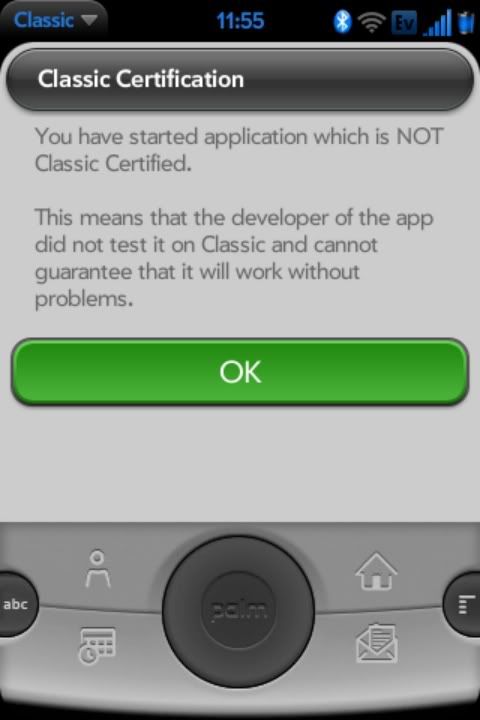

Great, a nag screen for all my older apps. Perhaps MotionApps think they are helping users. Perhaps it's trying to cover itself legally. Or perhaps they just want them to badger software makers into joining Classic's certification program.
Either way it is annoying. It gets in the way of my work. And worse yet, it reminds me of Microsoft's obnoxious User Account Control in Vista. Sure it only runs the first time I run an app inside Classic but unless I keep Classic running all day long—something which given Classic's stability problems is not realistic—I will wind up seeing this message hundreds of times a day as I start and stop Classic and apps within Classic.
Another new addition within Classic isn't quite so bad as the nag screen but it is puzzling. I give you full screen mode:
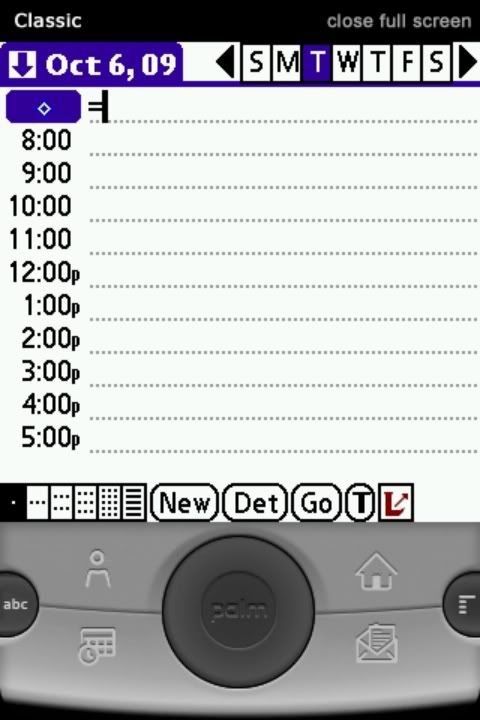
Not much to look at right? All it does is hide the Pre's top bar, giving you exactly zero extra pixels because it merely replaces it with its own considerably less useful and less informative top bar. Now if full screen mode would collapse the virtual d-pad and buttons and give you full use of the Pre's 480x320 screen, it would be something which I've wanted since the Pre debuted. As it is implemented now, Classic's full screen mode is both pointless and useless.
For the first time since I got my Pre I'm an unhappy user. Ever since updating to version 1.2.1, my Pre has been slow and buggy and I can't pin-point the reason why. Classic is getting in the way more than it is helping. And at a time when Palm is ramping up its efforts to get more apps onto the Pre, webOS doesn't want to load more than fifty apps at a time.
Are these just growing pains for a young platform with a bright future or is it a sign that Palm has reached the limits of its ability to create something good and useful for its users. I deeply hope that its the former and not the latter.
Labels:
Classic,
mobile computing,
MotionApps,
Palm,
Palm Pre,
Palm webOS,
usability
Tuesday, September 1, 2009
As Palm Pre's App Catalog Grows, Homebrew Scene Exposes a Potential Achilles Heel


In the less than three months since its release the Palm Pre's App Catalog has grown from a little over a dozen apps to forty five. So while it's not growing as fast as its fans would like Palm seems to be moving in the right direction in terms of courting developers. Rome—and all major software platforms—were not built in a day. And for those of us who are impatient and technically inclined, there is always the Homebrew scene.But it is the very popularity of the Palm Pre's Homebrew apps which expose a worrying concern. It seems that the Palm Pre limits the amount of space which it dedicates to storing applications. As a result, there is a limit to the number of applications which can be installed on the Pre. I have installed a lot of apps from the App Catalog and a lot of Homebrew apps on my Pre. All told, including the Pre's built-in apps, I have fifty-two apps on my Pre. And as a result, I often bump up against this storage limit and have to delete existing apps in order to install new ones.
When you consider the size of huge number of apps in the iPhone's App Store or even the Android Market, the problem with this approach is clear. There is no reason why I should be getting anything resembling an "out of memory" error on my phone when it still have three gigs of free storage space left. The original PalmOS in its heyday, had over 30,000 apps available for it and most of those apps are available for the Palm Pre thanks to the Classic emulator. So for Palm to have a limit on the number of apps that can be installed on its webOS devices like the Pre feels like a mistake which should be corrected sooner, rather than later.
Labels:
homebrew,
mobile computing,
Palm,
Palm Pre,
usability
Tuesday, June 30, 2009
Classic Running Smoothly Since Latest Palm Pre Update

Much has been made of the latest Palm Pre webOS 1.04 update closing an email hole which allowed the installation of homebrew apps while at the same time exposing the device to a serious security threat. But one thing that I've noticed as a user is that Classic hasn't crashed once since the update. It turns out that this is no coincidence. The update also addressed the stability problems that Classic was suffering. It also changed the Classic installation folder back to the ClassicApps/Install folder. This is the same folder which had been causing many of the "blue screens" in Classic.While it's nice that they fixed the blue screens, I had gotten used to using a second folder ClassicApps/PALM/Install to install software into Classic and now it doesn't work (this folder can and should be deleted by anyone who is running Classic on their Pre). This is no big deal in the larger sense—in fact it's a relief since it was confusing to have two install folders (one of which could cause Classic to crash) was confusing. But it would be nice if Palm had some sort of release notes in their update app explaining the reason for the update and that it was going to change the default behavior of one of their apps. I think that MotionApps has been working hard to communicate with the user community even if some of their attempts leave something to be desired. But Palm has a special responsibility as the gatekeeper to the Palm Pre and to webOS to work even harder to keep its users informed and something as simple as including a "What's New" blurb for OS updates in their Update app would go a long way in fostering better user satisfaction—providing a link to Palm's support page where you can eventually drill down to a brief explanation of the current update is not enough in my opinion.
On a positive note, Classic's increased stability has given me more confidence to install more PalmOS apps. Here are some apps which I've tried:
Bang!: Display is completely corrupted and the game is unplayable.
DateDiff: Runs well.
Documents to Go: Runs reasonably well. Docs to Go is a pretty complex application with numerous components so it's hard to tell which problems are a matter of incompatibility or of missing files. This is an app which really needs to be ported to webOS.
Haemoncrules: Runs well
Progect: Runs well.
Shortcut5: Runs well and I would love to see a utility like this one for webOS.
Statcoder Cholesterol: Runs well.
Stopwatch: Runs well.
TouchTetris: There seems to be some minor corruption of the graphics while the blocks are falling and this game is decidedly lo-res but otherwise it plays better on the Pre than it does on most PalmOS devices in part because of the Pre's finger-optimized screen.
Tricorder: Runs well, sound is very loud.
Labels:
Classic,
MotionApps,
Palm,
Palm Pre,
Palm webOS,
usability
Saturday, June 27, 2009
Palm Pre Feature Requests
Seen on the Precentral forums. A new website is collecting user requests for new and improved features for the Palm Pre. While it is completely unofficial, it seems like a worthwhile place to track user opinion and to make some and make some feature requests of your own.
Tuesday, June 23, 2009
The Dam Springs a Leak—Homebrew Apps Come to the Palm Pre
Despite the lack of an official SDK, webOS hackers have succeeded in creating homebrew apps which can be installed on the Palm Pre through email. While at this point it's more a security hole that needs to be plugged than an actual way to install applications, the upside is that it's still an exciting development that brings the Pre one step closer to getting a wider variety of apps.
Friday, June 19, 2009
Palm's Angsty Update
Due to heavy thunderstorms in the Chicago area, a large swath of the city and suburbs were plunged into darkness, including my own home which was without power for about four and a half hours. Without TV and without DSL Internet access, I turned to my phones with their 3G connections for information. Thanks to Palmdoc's Twitter feed, I learned that there is a new update for my Palm Pre which breaks the Classic emulator. So I'm sitting in the dark with only a flashlight to illuminate me, my Pre's battery is down to less than 50%, and I could break one of the applications which I depend upon the most. Naturally I had to try it.And sure enough, when the update installed and the Pre restarted, Classic crashed. But I wasn't too worried. I'd gone over the Treocentral thread which reported the problem carefully and thought that I had a good idea of what was going on so I connected my Pre to as a USB drive and cleaned out the ClassicApps directory, moving everything to my netbook. When I disconnected and started Classic, it came up just fine.
Interestingly enough following the 1.03 Pre update, Classic now reports its version as "1.1.05." It looks like there was an undocumented update for the Classic bundled in the Pre update. Which explains the crashes and the subtle changes in Classic's behavior. For one thing it is a little "slower" to start up in that the MotionApps logo takes longer to fade away even if though it is still possible to scroll through the Launcher and launch apps while the logo is displayed. Also, Classic now informs me that none of my apps is "Classic certified." (Tapping on this message launches the browser and displays Classic's web page but does not appear to offer any solutions at this time.) I'm not too worried about this as they all continue to work properly.

Classic has also added a Preferences item with a number of options. "Emulation Mode" allows you to choose from "Games," "Normal," "Fast," and "Safe" modes. Fast appears to be the default. Games mode enables sound in Classic but warns that it is very experimental and could cause Classic to crash. And indeed it does tend to crash once it has been restarted a few times. Normal also enables sound but toggles off Classic's "Turbo" mode. (Turbo mode is probably the reason why MotionApps claims that Classic is twice as fast as real PalmOS devices.) The speed difference between Normal and Fast modes are negligible but turning on sound support tends to cause Classic to crash. Safe mode turns off both sound and Turbo mode. In general the default Fast option seems to work best on with Classic.If you avoid the first Install folder, you should be fine but MotionApps would be wise to delete it altogether in order to avoid confusing users.
Update: Precentral reports that MotionApps has put up a blog post and FAQ to address the issue.
Labels:
Classic,
compatibility problems,
mobile computing,
MotionApps,
Palm,
Palm Pre
Monday, June 15, 2009
Applications Give Android An Edge Over webOS For Now
While I love my new Palm Pre there is a huge elephant in the room—actually two elephants, the iPhone and Android. Both of these platforms have large (freakin' huge in the case of the iPhone) catalogs of third-party applications and Android has one which really stands out for me—Google Maps. Google Maps is pretty ubiquitous on mobile phones these days with even cheap dumb phones having a version available to them. But versions vary from phone to phone and the one on the Palm Pre is lovely and easy to use. But on an Android phone like my T-Mobile G1, Google Maps is really special with desktop-like features like Street View integrated into the interface (I think that the iPhone version of Google Maps also has this feature). The Pre's version of Google Maps is comparatively simpler with a sleeker interface but no street view. And in the meantime, Google has just updated the Android version of Google Maps with new features. Every version of Google Maps has driving directions but the new Android version adds public transportation and walking directions—a feature which I love on the desktop. And Google has released it through the Android Market so there is no need to wait months on end for an over the air update as was the case with the Cupcake update.
Google Maps almost makes me want to choose my G1 over the Pre all by itself. Almost. At the end of the day the Pre is still faster than the G1 by a quit a bit and its GPS feels more accurate if for no other reason than because it can get an accurate fix more quickly.
Google Maps almost makes me want to choose my G1 over the Pre all by itself. Almost. At the end of the day the Pre is still faster than the G1 by a quit a bit and its GPS feels more accurate if for no other reason than because it can get an accurate fix more quickly. Still, if it were available on faster hardware it would be hard to recommend Palm's webOS over Google's Android at this point. Now that Documents to Go has arrived on Android, editing documents—a traditional strength of Palm devices—is poised to become a strength of Android. A version of Documents to Go for the Palm Pre has been promised but has not arrived yet.
While there is still a lot of promise in webOS for third party applications, without an available Software Development Kit, it's hard for people to actually create them. Right now most webOS development is taking the form of trying to hack the operating system and applications. Worse, it seems that Palm isn't supporting these hackers for fear of offending Sprint. But without an official SDK underground hacking is the only game in town for developers who aren't traditional friends of Palm like MotionApps and Dataviz. The fact that to date there are only thirty applications in the Pre's App Catalog at a time when there are thousands of apps in the Android Market and tens of thousands of apps in the iPhone App Store, only serves to underline how far Palm has to go to catch up the big boys.
Despite some hiccups Palm has done very well in rolling out the Palm Pre and the new webOS which powers it. MotionApps Classic application goes a long way to helping plug the gaps in Palm's App Catalog but it's not enough. Palm needs to put out an offcial SDK now.
Labels:
Android,
iPhone,
maps,
mobile computing,
Palm,
Palm Pre,
pictures,
screen shots,
T-Mobile G1,
video
Friday, June 5, 2009
Palm Pre Almost Here
I guess a picture is worth a 1000 words. After months of hype, the Palm Pre will finally be released tomorrow and my feelings are mixed. My plan is (was?) to wait six months to a year for an unlocked GSM version. But every time my T-Mobile G1 acts up a bit I wonder if I should make the jump. Even though I love my Android phone, the fact remains that it still hasn't replaced my Palm TX as a PDA—Palm's old PIM software and third party apps are just so easy and familiar that it's hard to find Android apps to truly replace them. The Pre as Palm's latest and greatest could be the device I've been waiting for; it promises to be even more web savvy than my G1 and the Classic emulator would allow me to run my old PalmOS applications, the best of both worlds. And it promises to be compatible with iTunes which would give me a nice, big screen for those movies I carry on my iPod but never watch because its screen is too small....While I'm eager to hold the Pre in my hands and actually play with it, I'm dreading the prospect of actually going through another upgrade. And then there's the prospect of switching carriers. I'm pretty happy with T-Mobile. They have good coverage and good 3G service here in Chicago. Sprint on the other hand had very bad coverage a few years ago and I have no idea if they've improved. For me Sprint really is the chink in the Palm Pre's armor.
I'll probably stick to my plan for now. I'll go and check the Pre out but I'm not planning to buy it. My G1 is very good for now and I'm still discovering new features since the Cupcake update.
Labels:
advertising,
ambivalence,
Android,
mobile computing,
Palm,
Palm Pre,
Palm TX,
Sprint,
T-Mobile G1
Thursday, June 4, 2009
Pre Reviews Begin to Trickle In

The Palm Pre is coming out soon and the big gadget websites are getting their reviews in:
Boy Genius Report loves webOS but feels that the keyboard is too small and that the Pre itself feels cheap and plasticky.
Gizmodo has a similar opinion.
Engadget puts up a huge three part review. They really loved the Pre but complained about glitches with Synergy and feel that Facebook integration fills your Pre with worthless contacts.
Update I: Boing Boing Gadgets has a much more complete roundup of Pre reviews.
Update II: Businessweek has one of the more negative reviews and it points out that MotionApps Classic application which allows the Pre to run PalmOS applications only has a seven day trial. This is disappointing as it becomes one more thing that users moving from older Palm devices will have to buy in order to upgrade to the Pre.
Update III: Associated Press has a fairly positive review with an interesting look the bugs which sap the Pre's battery life:
When I first got the Pre, I was dismayed by its battery life. I got less than 24 hours of light use out of it, and it would lose nearly a third of its charge if left inactive overnight. It turns out there's a bug that drains the battery if your Google instant-messaging account is connected to your AOL Instant Messenger account. Palm says it will fix that. When I logged Google out of AIM, I got much longer life.Update IV: Palminfocenter, one of the oldest and biggest Palm enthusiast websites, posts their exhaustive review of the Palm Pre.
I extended battery life even further by setting the Pre to receive my personal e-mail instantly rather than checking every 15 minutes. That's counterintuitive — usually getting the e-mail automatically "pushed" to a device consumes more power.
I ended up with nearly two days of battery life, which I think is acceptable for a hardworking smart phone. But it would be great if Palm made it easier to manage power consumption.
Labels:
Boy Genius Report,
Engadget,
Gizmodo,
mobile computing,
Palm,
Palm Pre,
Palm webOS,
review
Monday, April 20, 2009
CompanionLink to Bring Palm Desktop Sync to Palm Pre
One of the concerns for PalmOS users (at for this user) about the Palm Pre is data migration from older PalmOS devices. CompanionLink which for years provided solutions for syncing Palm devices with Outlook is now showing demo video of how syncing between a variety of desktop PIMs, including Palm Desktop and Outlook, and the Palm Pre will work.
This isn't a perfect solution for everyone I suppose since it uses Google as an intermediary but for those of us who have to use Google for their Android phones anyway, it makes migration to the Pre fairly natural. Now the biggest question is how much all this will cost. The Pre itself is likely to command a premium price when it debuts and MotionApps' PalmOS Classic emulator will likely be a separate purchase. Now we have CompanionLink's new desktop conduits as yet another potential expense. While a healthy eco-system of third-party applications will be necessary for the Pre to catch on, Palm also needs to consider the expense of upgrading from an existing PalmOS device to a Pre as well.
Labels:
Android,
compatibility problems,
Palm,
Palm Addicts,
Palm Pre,
Palm webOS,
PalmOS
Wednesday, April 1, 2009
MotionApps Brings PalmOS Apps to Palm Pre
Labels:
MotionApps,
Palm,
Palm Pre,
Palm webOS,
Palminfocenter,
PalmOS,
PDA,
Smartphone
Subscribe to:
Posts (Atom)