
People have been obsessing over their phones for a while now but I think that Palm may be taking it to a new level with webOS on its Pre and Pixi phones. Since Palm has committed to a regular upgrade schedule for webOS with big updates coming once a month along with minor updates in between the big ones. All told Palm has put out nine updates for webOS since June 2009 and buzz for the tenth update, webOS 1.4, is
growing among its
users.
Part of it is just the newness of the platform. Google's Android has been around for well over a year. Apple's iPhone has been around for three years. Palm's webOS has been around for just eight months and is still very much a work in progress. webOS 1.4 is expected to bring among other things support for video recording, a feature which the iPhone and Android phones have had for some time.
But I think that an essential part of all the phone angst that webOS is generating among its users is that Palm has always generated a strange dichotomy of feelings among its user community. The loyalty of the Apple user community is legendary and with the iPhone it has only grown and reached ever more cult-like proportions. Microsoft has its fanboys too but mostly its users tend to show more of a grudging acceptance than actual love. With Palm, the feel of the user community is a lot more complicated. Loyalty tends to mix with anger over
perceived wrongs and
missed opportunities which make members the Palm user community like one half of a separated couple—still in love but
distrustful and bracing for the worst.
My own phone angst is as much a result of the platform's newness as it is to the its rapid pace of development. I jumped on the Pre early on and I love to tweak the hell out of it using
Homebrew patches which I load through
Preware. And the Preware
people have worked hard to keep up with the pace of webOS development. As result, I sometimes have to deal with days when I have to uninstall and reinstall almost all my patches. Today was one such day as the Preware folks in anticipation of webOS 1.4 updated their patches for compatibility with it. As result I found myself staring at a phone which needed to update over forty patches. Luckily the Preware developers have worked hard to make this process as painless as possible and I clicked the "Update All" button and Preware went to work:
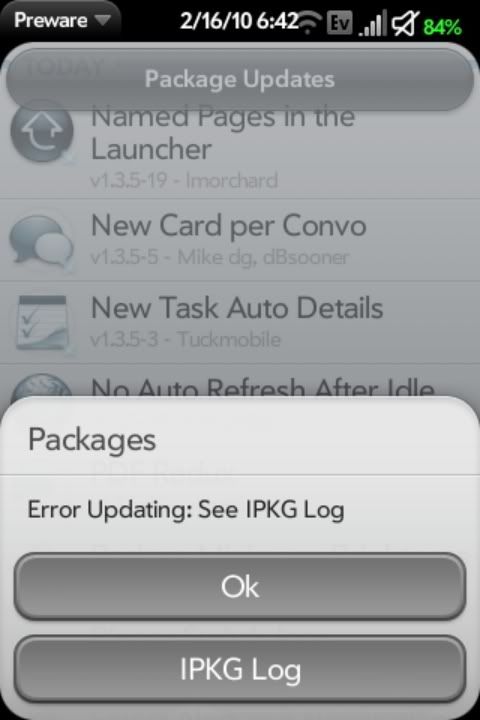
Arrrrgh!
I decide to try the "
Emergency Patch Recovery" (EPR) utility. This program has been useful to me in the past by allowing me to wipe out all of my phone's patches in one feel swoop rather than having to uninstall them one by one. But first I have to uninstall my phone's theme and do a Luna Restart (a quick restart that Preware can do when you don't need to do complete reboot). So I fire up Preware again and suddenly it only has to update seventeen patches instead of forty. Hmmm, that's new. So I hold off on running EPR and hit the "Update All" button again. So I close Preware and start it again. Now only nine patches need updating. So I hit the "Update All" button yet again. And this time Preware goes through the process without a hitch.
So all's well that ends well. I find a theme that I like, install it, and do a full reboot of my phone so all the updated patches can take effect. The surprising thing was that I did all this over the course of a couple of hours as I was going about my day. Except for the Java restart and the reboot at the end, my Pre remained in use doing other things while I had Preware churning away in the background (Preware takes a long time to load its list of applications and to do updates). It wasn't perfect but it was a much smoother process than what I've experienced in the past with having to update patches one by one. So my phone angst is a little lower at the end of this day...
...and that's a good thing because I'm going to have to do this all over again later this week or the next week when webOS 1.4 comes out.
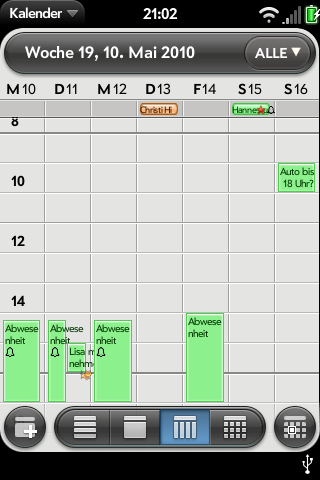 One of the shortcomings of the Palm Pre and Pixi the calendar application. While it is clean, simple, and arguably more powerful than its counterparts on the iPhone and Android; long time users of PalmOS can be forgiven for thinking that the webOS calendar feels dumbed down. Enter UberCalendar. A Homebrew patch for the webOS Calendar app, UberCalendar adds a number of enhancements to the calendar such as including the subject of an event in week view, more reminder times, the ability to remember and open the last calendar view when the Calendar app is reopened, buttons and shortcuts for entering new events, and a shortcut for launching the excellent Agenda Homebrew app which provides an at a glance view of all your upcoming Calendar entries. These enhancements along with others make the webOS Calendar more powerful and more pleasant to use.


