Showing posts with label homebrew. Show all posts

Sunday, August 29, 2010

As Homebrew Reaches New Heights, webOS Needs to Grow to Accommodate It

Photobucket

Photobucket
My Palm Pre is fourteen months old and I still can't find a phone that can replace it. While I have had plenty of opportunities to play with Sprint's Evo 4G and am eligible to upgrade to it; every time I handle it my reaction is the same. I love the hardware but can't help wishing that its Android operating system were half as elegant and as usable as the webOS.

One of the things that has kept me so enamored with webOS is the Homebrew developer community that sprang up around it shortly after the Pre was released. Is your phone too slow? You can overclock it. Need an easy way to block unwanted phone calls? There's a patch for that. Not happy with your Calendar? There's a patch for that too. Ever wish you could use your phone's flash LED as a flashlight? There are actually several patches for that. Not happy with the Pre's messaging app? There are fifty patches for that.

One recent example of the power of webOS Homebrew patches is Advanced Configuration for App Launcher. This patch is a mouthful and so is the list of improvements that it adds to webOS's spartan App Launcher. It also exposes how bad most modern phones are at the seemingly trivial task of launching apps.

Back in the days of PalmOS PDAs and phones like the Treo, the app launcher was a relatively simple application but in comparison to the webOS launcher it is far more powerful and sophisticated. It allowed users to easily organize their apps with categories that could be added, deleted, and renamed. And there were numerous third-party launchers available for PalmOS which provided users with a wealth of customization options.

The webOS launcher by contrast comes with a measly three unnamed screens with no visible way to create more. (I'm oversimplifying things for the sake of the argument since webOS's Universal Search feature does make it easy to drill down to your apps by typing out the first letter or two of their names but do keep in mind that in the case of the Palm Pre, the keyboard is often hidden beneath its slider which adds one more step to your searches.)

And the situation on other platforms, the situation is not much better. Android borrows a page from desktop computers by shoving all of its apps into its launcher but allowing you to clutter your phone's home screens with shortcut icons. And it further complicates things for users by allowing each handset maker and cell phone carrier to customize the Android user interface, tweaking things just enough so users can't always just jump to a new Android phone without relearning how to navigate through its UI. Apple's IOS4 is the most mature of the modern smartphone platforms and has the most advanced launcher. With multiple home screens, folders, and multi-tasking; IOS4 approaches the power and ease of use that PalmOS had almost a decade ago.

The situation with application launchers is indicative of the atmosphere in which the webOS Homebrew community is operating. Modern smartphone OSes are powerful but they have also thrown away a lot of little things that made older smartphones like the Treo so easy to use and powerful in their own right. In the year since the Pre came out, numerous webOS patches have been created just to improve the launcher: patches for creating, naming, and organizing launcher screens; for hiding and unhiding apps; and for making it easier to navigate through app screens. Advanced Configuration for App Launcher brings all of these tweaks under one roof. It allows you add and delete named pages to the launcher, creates tabs for easier navigation between screens, the list of features goes on and on—but more importantly; this patch makes it easy to turn features on and off; so your launcher can be as simple, or as complex as you wish.

Photobucket
While Advanced Configuration for App Launcher is a potent example of how a handful of hackers working in their spare time can build powerful software for webOS, it also points to the limitations of what Homebrew can accomplish. This patch has been a huge pain in the ass to install in recent days. And since it is being updated frequently, it has to be reinstalled a lot. And the author of the patch even warns you that it conflicts with a lot of other patches. In order to get Advanced Configuration for App Launcher to install, I had to use the Emergency Patch Recovery utility to uninstall all of my patches and reinstall them one by one, beginning with the problem patch.

While in the past I haven't minded wiping out all my patches—I even appreciated the opportunity to rethink how I use my phone and which patches I want to install. But I don't want to have to do this every time one of my patches is updated.

And this problem is becoming more common. As the number of webOS patches grows, the number of potential conflicts between individual patches grows. While webOS Internals and other Homebrew developers have worked hard to create tools to make the patching process as painless as possible, there is only so much that they can do. Sooner or later, it will become necessary for Palm or perhaps HP to get involved with the Homebrew community beyond just offering gentle encouragement.

Many webOS patches are simple hacks which should have been in webOS from day one. Palm should be looking at the Homebrew patches that are out there and adding some of them to webOS. They should also create some sort of framework which will make it easier to add little tweaks (maybe HP-Palm can call them "extensions") to webOS without restarting the UI. As HP prepares to build a wide variety of devices based on webOS, such a system might even make it easier to customize webOS for use on a variety of form factors.

Sunday, July 11, 2010

KeyBoss - PreCentral Forums

Photobucket
One of my favorite apps on my old Treo phones was KeyCaps a utility which allowed me to capitalize letters and enter function symbols without using the phone's shift or alt keys. KeyCaps greatly speeded up my input and was one of the apps which I really missed when I moved to my Palm Pre. Now KeyBoss is recreating that functionality on webOS. While KeyBoss is currently in Beta and should only be installed by advanced users, I have tried it and it works well. This should be a must have utility for webOS homebrew users once it becomes available the main Preware feeds. KeyBoss - PreCentral Forums

Saturday, June 5, 2010

UberCalendar, Smart Up Your webOS Calendar

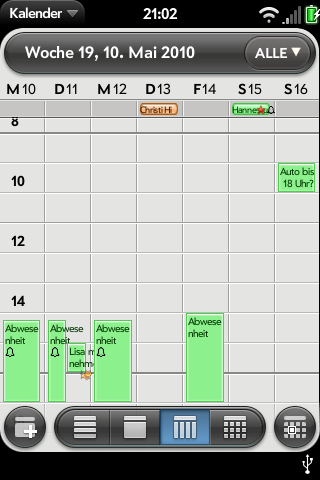
One of the shortcomings of the Palm Pre and Pixi the calendar application. While it is clean, simple, and arguably more powerful than its counterparts on the iPhone and Android; long time users of PalmOS can be forgiven for thinking that the webOS calendar feels dumbed down. Enter UberCalendar. A Homebrew patch for the webOS Calendar app, UberCalendar adds a number of enhancements to the calendar such as including the subject of an event in week view, more reminder times, the ability to remember and open the last calendar view when the Calendar app is reopened, buttons and shortcuts for entering new events, and a shortcut for launching the excellent Agenda Homebrew app which provides an at a glance view of all your upcoming Calendar entries. These enhancements along with others make the webOS Calendar more powerful and more pleasant to use.

The UberCalendar just debuted and is a little rough around the edges. One example of this is that UberCalendar supports the use of icons for events but these icons must be downloaded and saved separately on your phone's media partition. While this gives you more options for customizing your Calendar, it can be confusing for less advanced users. But then again, Homebrew software is by definition software for advanced users. More importantly, even with its current shortcomings, UberCalendar is the best add-on for the webOS Calendar available and is a must have for anyone who wants to get more out of their phone's calendar.

Once again UberCalendar is a Homebrew app and is not available through the official Palm App Catalog. It can be installed through Preware or with WebOS Quick Install.

Saturday, May 8, 2010

zcorder Brings Voice Recording to webOS

Photobucket
One of the major omissions from webOS phones like the Palm Pre and Pixi is a lack of a voice recorder. While MotionApps has made its Voice Memo app a free add-on for users of its Classic PalmOS emulator, it has the disadvantage of needing to be run from inside another relatively slow-loading application. Worse yet, I personally have never been able to get Voice Memo to work properly on my Palm Pre.

I've never been a huge user of this feature but I do miss it. And some people swear by it; so the arrival of zcorder onto the webOS Homebrew scene should be welcome.

Zcorder records both voice and sound from other running webOS applications. It is a very simple application. Your recordings are saved as MP3 files to a folder on your phone's internal memory and while you can browse them when you connect your phone to a computer in USB mode or use the Homebrew app Internalz to browse through them but you cannot manage your recordings in zcorder as you can with a true "voice memo" application.

But it works and for now it is the best bet for voice recording on webOS.

Zcorder is a Homebrew app and is not available through the official Palm App Catalog. It can be installed through Preware or with WebOS Quick Install.

Thursday, May 6, 2010

Brightness Unlinked

Photobucket
Brightness Unlinked is a Hombrew app which solves two common problems for users of the Palm Pre.

There is no way to adjust the brightness of the Palm Pre's keyboard independently of the screen's brightness. Normally this is not a problem but sometimes—particularly in low light conditions—you want to turn down the brightness of the Pre's screen as much as possible. But when you do this, the backlight on the Pre's keyboard can become so dim that it becomes hard to type. Enter Brightness Unlinked. With Brightness Unlinked running, you can crank up the lighting on your keyboard while cranking down the lighting of the screen.

But for me the best feature of Brightness Unlinked is the fact that it can turn off the Pre's screen when it is sitting on the Touchstone charger. In theory, the Pre can double as a bedside clock while sitting on its charger but in practice its screen—even at its lowest level—is far too bright for anyone who wants to get a good night's sleep. So while you may never find yourself typing away on your phone in gloomy twilight, Brightness Unlinked is a must have app for anyone who keeps their Palm Pre by their bedside.

There is also a patch which will allow Brightness Unlinked to run every time you restart your phone but I found that it seemed to make the phone sluggish when you are low on memory. I never quite figured out if it was because of the patch or simply because my Pre was low on memory. But in any case, I found the patch to be rather redundant since Brightness Unlinked can reside the webOS Dashboard and can continues to run even if you throw away its card.

Brightness Unlinked is a Homebrew app and is not available in the regular Palm App Catalog. It can be installed through Preware or with WebOS Quick Install.

Tuesday, February 16, 2010

Phone Angst

People have been obsessing over their phones for a while now but I think that Palm may be taking it to a new level with webOS on its Pre and Pixi phones. Since Palm has committed to a regular upgrade schedule for webOS with big updates coming once a month along with minor updates in between the big ones. All told Palm has put out nine updates for webOS since June 2009 and buzz for the tenth update, webOS 1.4, is growing among its users.

Part of it is just the newness of the platform. Google's Android has been around for well over a year. Apple's iPhone has been around for three years. Palm's webOS has been around for just eight months and is still very much a work in progress. webOS 1.4 is expected to bring among other things support for video recording, a feature which the iPhone and Android phones have had for some time.

But I think that an essential part of all the phone angst that webOS is generating among its users is that Palm has always generated a strange dichotomy of feelings among its user community. The loyalty of the Apple user community is legendary and with the iPhone it has only grown and reached ever more cult-like proportions. Microsoft has its fanboys too but mostly its users tend to show more of a grudging acceptance than actual love. With Palm, the feel of the user community is a lot more complicated. Loyalty tends to mix with anger over perceived wrongs and missed opportunities which make members the Palm user community like one half of a separated couple—still in love but distrustful and bracing for the worst.

My own phone angst is as much a result of the platform's newness as it is to the its rapid pace of development. I jumped on the Pre early on and I love to tweak the hell out of it using Homebrew patches which I load through Preware. And the Preware people have worked hard to keep up with the pace of webOS development. As result, I sometimes have to deal with days when I have to uninstall and reinstall almost all my patches. Today was one such day as the Preware folks in anticipation of webOS 1.4 updated their patches for compatibility with it. As result I found myself staring at a phone which needed to update over forty patches. Luckily the Preware developers have worked hard to make this process as painless as possible and I clicked the "Update All" button and Preware went to work:

Photobucket

Arrrrgh!

I decide to try the "Emergency Patch Recovery" (EPR) utility. This program has been useful to me in the past by allowing me to wipe out all of my phone's patches in one feel swoop rather than having to uninstall them one by one. But first I have to uninstall my phone's theme and do a Luna Restart (a quick restart that Preware can do when you don't need to do complete reboot). So I fire up Preware again and suddenly it only has to update seventeen patches instead of forty. Hmmm, that's new. So I hold off on running EPR and hit the "Update All" button again. So I close Preware and start it again. Now only nine patches need updating. So I hit the "Update All" button yet again. And this time Preware goes through the process without a hitch.

So all's well that ends well. I find a theme that I like, install it, and do a full reboot of my phone so all the updated patches can take effect. The surprising thing was that I did all this over the course of a couple of hours as I was going about my day. Except for the Java restart and the reboot at the end, my Pre remained in use doing other things while I had Preware churning away in the background (Preware takes a long time to load its list of applications and to do updates). It wasn't perfect but it was a much smoother process than what I've experienced in the past with having to update patches one by one. So my phone angst is a little lower at the end of this day...

...and that's a good thing because I'm going to have to do this all over again later this week or the next week when webOS 1.4 comes out.

Wednesday, September 2, 2009

The Palm Pre Gets An Onscreen Keyboard. Yay?

PhotobucketPhotobucket One of the reasons why I never got an iPhone was because I could never get used to its virtual keyboard. Still, once an onscreen keyboard became available for the Pre which was relatively easy to install, it made sense to at least give it a try. And the results were about what I had expected. While the ingenuity of the Virtual Keyboard is admirable (when tap the "Sym" button, you can scroll down and enter any symbol that the keyboard is capable of entering), it is ultimately too small to use comfortably especially in comparison with the Pre's slide out hardware keyboard.

There are also other problems. While the Pre's built-in error correction is fairly meager compared to that of the iPhone, it does come in handy for little things like putting apostrophes in contractions and automatically capitalizing letters at the beginning of sentences. This does not work with the Virtual Keyboard even though realistically, you will tend to make more typos with it than you would with the hardware keyboard—disappointing to say the least.

But the Virtual Keyboard does have its uses. It's great for pulling up recently visited pages and bookmarks in the web browser which usually come up after typing a couple of letters. It's a small thing but it is potentially very convenient since you no longer have to slide open the keyboard in order to type two or three characters.

More than anything else, the Virtual Keyboard makes me miss Palm's old Graffiti writing system. A fairly simple, easy to learn set of onscreen strokes which allowed users to enter information without any kind of keyboard, Graffiti was one of the things that got me hooked on the old PalmOS. And it would be a nice thing for some enterprising developer to try to bring to the Palm Pre.

Tuesday, September 1, 2009

As Palm Pre's App Catalog Grows, Homebrew Scene Exposes a Potential Achilles Heel

PhotobucketPhotobucket
PhotobucketIn the less than three months since its release the Palm Pre's App Catalog has grown from a little over a dozen apps to forty five. So while it's not growing as fast as its fans would like Palm seems to be moving in the right direction in terms of courting developers. Rome—and all major software platforms—were not built in a day. And for those of us who are impatient and technically inclined, there is always the Homebrew scene.

But it is the very popularity of the Palm Pre's Homebrew apps which expose a worrying concern. It seems that the Palm Pre limits the amount of space which it dedicates to storing applications. As a result, there is a limit to the number of applications which can be installed on the Pre. I have installed a lot of apps from the App Catalog and a lot of Homebrew apps on my Pre. All told, including the Pre's built-in apps, I have fifty-two apps on my Pre. And as a result, I often bump up against this storage limit and have to delete existing apps in order to install new ones.

When you consider the size of huge number of apps in the iPhone's App Store or even the Android Market, the problem with this approach is clear. There is no reason why I should be getting anything resembling an "out of memory" error on my phone when it still have three gigs of free storage space left. The original PalmOS in its heyday, had over 30,000 apps available for it and most of those apps are available for the Palm Pre thanks to the Classic emulator. So for Palm to have a limit on the number of apps that can be installed on its webOS devices like the Pre feels like a mistake which should be corrected sooner, rather than later.

Sunday, July 26, 2009

The Palm Homebrew Community Kicks Into High Gear

Life is good for a Palm Pre user who's not afraid to take risks with his phone. Precentral has turned into an unofficial clearinghouse for the hackers who are delving into the innards of the Pre's operating system and building new apps at a time when Palm's App Catalog has been stuck at thirty apps for a month.

While there are already several Twitter apps in the App Catalog, my current favorite is probably Twee which has a multitude of features a slick interface. Other new homebrew apps include PreChess, Comics, and Mine Search which is a version of the classic Minesweeper game. But the most exciting app by far is probably FileCoaster which downloads and installs homebrew apps to the Pre. It's an exciting time to be a geek.
Photobucket

Sunday, July 19, 2009

Homebrew Apps Provide a Fun Outlet for Impatient Pre Users

PhotobucketPhotobucketPalm recently released its Mojo Software Development Kit to developers. This is a good thing because I was getting sick of seeing only 30 apps in the Pre's app catalog. There will still be a wait as developers create and and submit applications to Palm for approval. In the meantime, the Classic emulator allows you to use most of the thousands of PalmOS apps that have been created over the years and there are always web apps which can be both fun and useful. And now, Homebrew apps created by hackers for the Pre are becoming both useful and easy to install.

The first app pictured here is Pretris, probably the best of the homebrew games available for the Palm Pre. A fairly simple but attractive Tetris clone for the Pre, Pretris is a good example of how the Pre's webOS allows for the rapid creation of fairly polished apps. In addition to Pretris there is also a pretty good homebrew Solitaire game available for the Pre.

Besides games there are also useful utilities available for the Pre. Translator and Currency Converter are probably my favorites among the homebrew utilities. Even though the installation tools are partially command-line based, they were fairly easy to install. (By contrast, I have yet to successfully install Palm's Mojo SDK, the damn thing keeps stopping and rolling itself back during the installation process.) And it makes installing your homebrew apps as easy as dragging and dropping them onto a desktop icon.

While it would be unrealistic to pretend that there is absolutely no risk to using this homebrew software, so far I have encountered no problems with the half-dozen or so apps I've installed. In theory the developer mode which the Pre has to be put into in order to enable app installation is a potential security risk but it is also fairly easy to enable and disable.

The speed with which these homebrew apps have sprung up is remarkable and bodes well for the future of application development for the Pre's webOS.
PhotobucketPhotobucket