Showing posts with label Smartphone. Show all posts

Wednesday, June 2, 2010

Phone Angst, Part II: Will HP Kill Palm Smartphones?

I was feeling pretty happy with my Palm Pre until I started seeing this headline making the rounds of the Internet: HP CEO: 'We didn't buy Palm to be in the smartphone business' | PreCentral.net. Here we go again. I have been hearing about the imminent demise of Palm for almost as long as I have used Palm's products. In the past it has been little more than the rantings of disgruntled users but this time it's the CEO of Palm's soon to be parent company which while not actually suggesting that it is not interested in Palm's core business. While that may not have been his intent, it is a troubling thing to hear nonetheless.

When I first bought my Palm Pre almost a year ago, it was because I was looking for a platform which I could use over the long haul. After a decade of using PalmOS PDAs and smartphones, my attempt to move to Android in the form of the T-Mobile G1 did not work out. It was a technically amazing mobile platform which fell wildly short of the ease of use that I had enjoyed with PalmOS.

The Pre and webOS felt like a second chance to me. It was an open, modern mobile operating system which was backwards compatible with PalmOS through the Classic emulator. It seemed like the perfect platform for my needs. And it has only gotten better in the past year with regular updates.

But none of that matters if I can't buy another webOS smartphone once my Pre no longer works. While my Pre is still going strong, it is also showing its age. It has a small crack on the upper left hand corner of the screen—it's barely noticeable now but it's sure to grow over time. It is beginning to suffer from the infamous "oreo effect" where its slider flexes in a left to right fashion. And I have to overclock its processor for it to be as fast as newer phones. While a webOS tablet would be cool it will not be able to take the place of my Pre when it finally gives up the ghost.

While it's entirely possible—even probably—that Palm or HP might clarify the situation to give Palm's smartphones a vote of confidence, I feel more cynical about the platform today than I even have before.

Update: After reading some of the discussion at Precentral and the ZDNet article which helped provoke a lot of the discussion, I am probably a little more reassured that webOS is part of a larger strategy which calls for a large number of devices which presumably includes smartphones. But I still have to wonder if HP won't simply let Palm die away slowly the way they did with its Jornada PDAs and Compaq's iPAQ line of PDAs and smartphones. Only time will tell I guess.

Tuesday, March 16, 2010

Maybe the Nexus One Wasn't Supposed to be a Hit

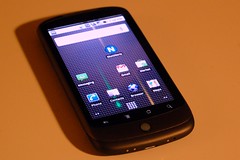
(19/365) Do I miss my iPhone? One week of Goog...Image by spieri_sf via Flickr

There has been quite bit of buzz about the Nexus One and its failure in the marketplace. Google's first branded smartphone has sold only 135,000 units, making it a bona fide flop. But I have to wonder if Google needed or even wanted it to succeed. While the Nexus One was Google's first smartphone, it was hardly a unique product. It was only one of a rather long and always growing line of Android handsets being built by a wide variety of cell phone vendors. In fact, I distinctly recall a lot of grumbling that with the Nexus One, Google was going to be competing directly with its own customers, the companies which had licensed the Android operating system.

And this makes the "failure" of the Nexus One fairly convenient for Google and for its licensees. Now Google can reassure its licensees, "See guys, we're not taking away sales from you!" But despite the lackluster sales, the Nexus One did raise the bar putting powerful hardware into an attractive package which handset makers still have to match. And this was likely the point of the Nexus One all along to let competitors like The Droid get the sales while the Nexus One keeps them honest and nudges them in the direction that Google wants them to go. No more underpowered Android handsets.

This wouldn't be the first time that Google has done something like this, putting out a product that was designed more to nudge rivals than to actually succeed on its own. While Google Chrome is growing in popularity and is now the basis for an ambitious new operating system, Chrome's original purpose seemed to be to assure that Google apps like GMail would run really, really fast. As a result, Chrome was a very fast browser with no extensions, no themes, and other glaring flaws. If the history of Chrome is any indication, I doubt if anyone at Google is losing any sleep over the Nexus One's sales.
Reblog this post [with Zemanta]

Friday, March 5, 2010

Google Reinvents Graffiti

Google has added a new feature to Android which looks a lot like an old feature from another mobile OS. Palm's old PalmOS PDAs had stylus-based input system called "Graffiti" where you would enter characters based on set of predefined pen strokes. It worked very well for years until the emergence of smartphones required Palm and Handspring to adopt keyboards for their devices. Add a long lawsuit by Xerox and Graffiti disappeared into the mists of gadget history.

Sort of. The idea of Graffiti remains popular enough that there is even a version available for iPhones. So it was probably only a matter of time before someone tried to bring it to Google's Android OS. That someone turned out to be Google itself which recently released a Gesture Search application which allows you to run searches by simply drawing letters. This is essentially what you did with the old PalmOS Graffiti.

But Gesture Search is a single standalone application while Graffiti was an essential part of the PalmOS and could be used with every PalmOS application. In fact even after Palm abandoned having a dedicated Graffiti input area for its Treo phones, it was still possible to install an app which would allow you to enter Graffiti strokes directly on the phone's screen.

That has gotten me to think about webOS on my Palm Pre. While there is a virtual keyboard available for webOS, there is nothing like Graffiti or even Gesture Search available for webOS. And that's disappointing because after all, Palm was the company which made this sort of input work in the first place.

And I think that Palm is uniquely suited to make it work again. Palm already has the code to Graffiti and Graffiti II—the successor to Graffiti which Palm introduced in part because of the Xerox lawsuit. And Palm has a its dashboard notification system which would be a convenient place to keep the controls for a Graffiti-style input system. So there really is no reason why Palm couldn't create another version of Graffiti and have it work on the entire operating system.

I used Graffiti for years on Palm PDAs. And I've used smartphone keyboards for years. But I was never really able to get used to using virtual keyboards which is one reason why I never got an iPhone. Now if I could have Palm's old Graffiti writing system back and have it live in my Palm Pre's dashboard, that would be a great alternative to sliding open my Pre when I only have to enter one or two characters.

Official Google Mobile Blog: Search your Android phone with written gestures

Friday, October 16, 2009

In Praise of Hard Buttons

SAN FRANCISCO - OCTOBER 21:  The new T-Mobile ...Image by Getty Images via Daylife

LAS VEGAS - JANUARY 08:  A new Palm Pre smartp...Image by Getty Images via Daylife

Winter hasn't exactly come early to Chicago but it is unseasonably cold right now—cold enough that I've had to break out a jacket and gloves. This kind of leaves me in a bind gadgetwise. I still love my Palm Pre and am satisfied with its little sliding keyboard but the cold weather makes it less useful when I'm out in the cold. While the Pre is a slider phone a perfectly usable little keyboard, when the slider is closed the Pre is basically all screen with a single button that does only one thing. Other than turning it on and off and changing the volume, all other interaction with the Pre is through its screen. Normally this is no problem—in fact it's normally quite enjoyable. But when you are wearing gloves suddenly it becomes impossible to interact with the Pre.

Now contrast that to my older T-Mobile G1. The most recent firmware update gave this phone a new lease on life by making it fast enough to be usable again. And now the cold weather is is making it a lot more relevant for me because it has something that the Pre lacks—real hardware buttons. The G1's trackball is very responsive and allows me to interact with the phone quickly and efficiently. The home button allows me to get to the G1's "desktop" and access my shortcuts. And finally, the back button helps me get around the phone even faster.

I've always felt that the G1 was something of a evolutionary odd duck. Not as pretty as the iPhone or as elegant as the Pre but an interesting phone because it shows the potential of Android as a phone OS. With the release of the Pre and its webOS operating system, suddenly the potential of Android doesn't fascinate me aas much as it used to. But the ability to scroll through a bus tracker web site on a cold day without having to take off my gloves doesn't need to be fascinating, it just needs to be quick and efficient.
Reblog this post [with Zemanta]

Tuesday, June 23, 2009

Keyboards Compared—Treo, G1, and Pre

Size isn't everything. That's what we tell ourselves and to a certain extent it's true. At least it's true in the case of smartphones. I've compared the Treo 680's keyboard to that of the T-Mobile G1 before and now that I am migrating to the Pre, I have another comparison to make.

I am making more typos with the Pre but it's more than just a matter of the keyboard. Most of the typos that I make with the Pre are on web forums where the font can sometimes become uncomfortably small and hard to read for my aging eyes. While I can easily zoom in and out to compensate, when I do this I can no longer see everything I am writing.

Still the small keyboard is a little harder to type on than my old 680 keyboard was. Both the G1 and the Pre have a problem with causing fatigue during long writing sessions but for different reasons. While the G1's big keyboard is fairly comfortable to type on at first, the G1 itself doesn't feel quite right in my hand while I'm typing and that leads to fatigue. With the Pre the keyboard's small size is the culprit for my fatigue. So of the three the oldest machine, the 680, is the best for thumbtyping. It's smooth, domed keys feel better than the G1's flat keys and the Pre's sticky keys.

The 680's keyboard is also easier to see with their bright backlighting. Of all the phones I've played with, the Treo 650/680 had the best backlighting. The G1's wimpy backlight can actually impair its visibility in certain lighting conditions as it turns the keyboard letters a light gray color which contrasts poorly with its silvery keys. The Palm Pre represents a nice compromise between these two extremes. The Pre's backlighting is very subtle and almost impossible to see under most lighting conditions but under total darkness it works perfectly. While this may not seem like a huge achievement, it's a huge improvement coming from the G1. And even coming from the 680 the visibility of the Pre's keyboard is good as its bright white letters and orange numbers pop nicely when viewed against their black background.

One of the problems with the G1 ane Pre's sliding keyboards is the fact that they are not always available. They have to be opened in order to be used. With the G1 it's a struggle to open with one hand, it is inherently a two-handed device. The Pre by contrast slides open quite easily with one hand—you just push your thumb against the screen. As a result, one handed use—which was one of my favorite features of the Treo—is very easy with the Pre. One-handed of the G1 nearly impossible although the onscreen keyboard which was added in the Cupcake update helps in this regard. But for me virtual keyboards are more difficult and uncomfortable to use than physical ones so the G1 is ultimately a more cumbersome device for me.

Obi-Wan KenobiImage via Wikipedia

The Pre by contrast is much more elegant and this is especially true in contrast to the G1 and the 680 both of which very utilitarian in their design. It's system of gestures works very naturally and fluidly and even helps enhance the keyboard by acting as a virtual menu key for using the Cut, Copy, and Paste shortcuts. When I handle the Pre, I can't help but think about Obi-Wan Kenobi's line in Star Wars about his light saber, "a more elegant weapon for a more civilized age." I suppose this sort of statement makes me a huge drooling fanboy but gadgets are as much about the way they make their users feel as they are about helping them get work done. When I used my 680, I was frustrated by its bugs. When I used the G1, I was frustrated by its sluggishness. With the Pre, I just flat out enjoy using the device and its bugs don't bother me as much as the bugs on the 680 and the G1 did.
Reblog this post [with Zemanta]

Friday, June 12, 2009

Palm Pre Hacked—But in a Good Way


Shortly after the Palm Pre became available on Saturday, gadget enthusiasts began hacking at it. It began when a special developer tool which contained most of the source code for the Pre's software was leaked. Apparently people have been pouring over the code, seeing how to hack it. They've created the obligatory "Hello World" app and more impressively (but just as obligatorily) have begun porting the classic "Doom" computer game to the Pre.

A similar thing occured when the original iPhone was release and hackers worked to "Jailbreak" it as a time when Apple was severely restricting the applications that users could install. It's an exciting time for Palm's new phone.

Wednesday, April 1, 2009

MotionApps Brings PalmOS Apps to Palm Pre

One of my misgivings about Palm's upcoming Pre smartphone with its fancy new webOS and way cool Synergy with all of your Internet based information was that it was not backwards compatible with PalmOS applications. Now MotionApps is creating an emulator for running PalmOS apps on the Palm Pre's webOS operating system. This is pretty good news for me even if it means I have to shell out more money for the application. I've depended on PalmOS applications for a decade and I still haven't found better alternatives for many of them on other platforms. So I'm a little more excited about the Pre than I was yesterday.

Friday, January 16, 2009

Will The Palm Pre Leave Me Cold?

Yesterday was a bitterly cold day in Chicago, with temperatures reaching as low as -11 degrees Fahrenheit. Today wasn't much better and it was fairly mild here compared to other parts of the Upper Midwest. That got me thinking about how I use my phone when I'm out in the cold which got me thinking about Palm's recent announcement of its new phone.

The Pre is a lovely phone with a cool new operating system and a sophisticated system of multi-touch gestures which promises to revolutionize smartphones. This last part is what concerns me on this cold day. One of the reasons why I never wanted an iPhone was because of the virtual keyboard. It was hard for me to type with and I really appreciate being able to type on my Treo and T-Mobile G1 keyboards even while wearing light gloves. Now the Pre does have a keyboard and its portrait orientation means that it would probably be good for one-handed typing—something that I've sorely missed since upgrading from my Treo to my G1. But the Pre is also going to be heavily reliant upon a system of gestures which will require bare hands. Without an alternative to these gestures for navigation, I'm not sure I'd enjoy using a phone like the Palm Pre during a cold January winter in Chicago.

Monday, May 5, 2008

Palm—Always Dying, Never Dead

It seems that every time I look on the Internet, I see someone asking "is Palm dead?" And the answer from disgruntled Palm PDA and smartphone users is usually a mixture of bitter agreement, hand wringing, and denial. I try to take these comments with a grain of salt. Palm has been "dying" for most of its more than decade-long existence. I seem to recall the first "Palm is dead" posts appearing on Usenet almost as soon as Microsoft introduced Windows CE in order to create devices which would compete with PalmOS PDAs—that didn't happen. Searching through Google's Usenet archive, for the words "palm dead" the oldest thread on the subject of Palm's imminent death is dated May 27, 2001. That was seven years ago and Palm still hasn't died yet.

A lot of this is the natural Internet bitching and moaning that has always dominated Internet discussion. Part of it is that Palm has been legitimately in trouble several times over the years since they went public at the height of the dotcom era. But I think that a lot of it has been Palm's own fault. Palm has always been a very secretive company and yet it also makes a lot of clumsy attempts to reach out to its users. A good example of these problems is the Palm Foleo fiasco. For years Palm had hinted at the existence of a new class of mobile devices that they wanted to sell. Palm's founder Jeff Hawkins dropped tantalizing hints for almost two years. When the Foleo was finally near completion they hyped the device to jaded users who were skeptical of its modest specs and high price. And then, they abruptly decided that the device was flawed and canceled its release. And as a final insult, several rival companies quickly released similar products which sold very well. I can't help but think that a disaster like this one could have been avoided if Palm had communicated earlier and more effectively with its users.

Friday, April 18, 2008

Entertainment on the Go, Beauty vs Functionality

My iPod broke the other day. But even though I'm constantly listening to music and watching videos, I haven't really missed it. This is mainly because I already carry around a pretty good media player, really two. My cell phone, a Palm Treo 680 and my PDA, Palm TX, both already have a good built in MP3 player in PocketTunes and it's easy to view video on both devices with an application called CorePlayer. On top of that, the TX also has wifi and can use the Treo as a modem which means I have have Internet access anywhere I go.

It's almost like having an iPhone except that my Treo and TX are two year old devices which could do what they do long before Apple introduced the iPhone. And they can do even more. Both devices have great built-in calendar and note taking software and a multitude of available third-party software for including Documents to Go for editing Word and Excel files, e-book readers, and games. I can even use software to convert my Palm TX into a remote control. The iPhone meanwhile can't even copy and paste yet and has to be "Jailbroken" in order to install third-party applications. Apple promises that it will allow third-party apps onto the iPhone and iPod Touch, it looks like they will be tightly restricted.

So why are Apple's iPod, iPhone, and iPod Touch so popular while Palm's products wallow in obscurity? It seems to be a mixture of marketing, opportunity, and technology. You can take an iPod out of its box, charge it, install iTunes on your computer and you're all set. The iPod is ready to use. The iPod is tightly integrated with iTunes and you can import your music library easily or build one by buying music and movies directly from the iTunes Music Store. And if you buy a new iPod, you just plug it into the same computer and import your music library.

When you take a Palm PDA or Smartphone out of the box, it's the beginning of a long process. You have to install some sort of synching software on your computer and it can vary widely depending your computer, your choice of PDA or Smartphone, the phase of the moon, and whether or not you are upgrading. Treos and Palm PDAs can synch with Microsoft Outlook but they can also synch to Palm's own Palm Desktop which is a fairly simple easy to use application. Unfortunately, Palm Desktop has numerous compatibility issues and sometimes it seems that each new Palm PDA or Smartphone has its own version.

While Palm Operating System's huge library of third-party software is its greatest strength, it's installed software is relatively weak. While most newer Palms and Treos usually come with Documents to Go and PocketTunes, I've yet to see a Palm PDA or Smartphone with a decent video player. There doesn't seem to be a good reason for this—there are at least two good third-party video players available for the PalmOS that I know of: Kinoma and CorePlayer which can be bought and installed on your Palm PDA or Smartphone. And there is even a free version of CorePlayer called "TCPMP" which is widely available. So if Palm can license Documents to Go and PocketTunes, why not do the same with either Kinoma or CorePlayer? Well, in a sense they have done just that—newer Palm smartphones like the Centro and my own Treo 680 do have an embedded video player which appears to have been licenced from the makers of the Kinoma video player. But as far as I can tell, it's not a standalone application. You can't just throw an .avi file onto the Palm's storage card and play it unless you have already purchased and installed a third-party video player.

That brings me to the other big problem with Palms as media players—size. Not the size of the device but the size of the devices' onboard storage. My Palm TX has a 2GB Secure Digital storage card. That's good enough for about two hundred songs, a little less than two hours of video, thousands of pictures, lots of documents, many Palm applications, and leaves plenty of space left over for more stuff. But my iPod had a 30GB hard drive enough for over 2200 songs, over 20 hours of video, and over seventy podcasts and the iPod was still only about three quarters full. There has never been a Palm PDA or Smartphone which can compare to that kind of storage capacity. Also, you have to buy a seperate SD card in order to have any storage capacity at all.

Finally, I mentioned podcasts above. I don't think that I'm the only schmuck with a blog on the Internet who is addicted to podcasts. Apple realizes this and makes it easy to subscribe to podcasts directly from iTunes. In the Palm universe, podcasting might as well not exist. I actually did roll my own solution for downloading podcasts and synching them to my Palm LifeDrive and used it for over a year but that particular PDA had capabilities which Palm never duplicated on its latter models. In a way it's sad, the Lifedrive could have been Palm's version of the iPod Touch two years ago but it had several serious flaws and Palm never created a followup product to address these issues.

But at least they've made their products good enough that I didn't have to automatically run off and buy a new iPod when my old one broke.